Pools
The Pools page is the operator surface for routing boundaries. A Pool groups the upstream accounts that can receive work, the Pool API keys that clients use, routing behavior, and the metadata scope used by request logs and audit logs.
Use this page when you need to answer:
- which Pools exist
- whether a Pool is active, disabled, or archived
- how many upstream accounts and API keys are tied to a Pool
- how much recent traffic the Pool handled
- how new runtime requests are routed across eligible upstream accounts
The page is metadata-only. It shows Pool names, counts, routing settings, usage totals, safe status labels, and links to related admin pages. It does not show prompts, responses, files, audio, images, websocket frames, raw bearer tokens, raw Pool API keys, upstream secrets, or Codex auth.json contents.
What a Pool Controls
Section titled “What a Pool Controls”A Pool is the boundary that a runtime client authenticates against. Clients do not authenticate as one upstream account. They send a Pool API key, then Codex Pooler chooses one eligible upstream account inside that Pool.
A Pool controls:
status, which decides whether the Pool can receive new work- upstream assignments, which decide which accounts are available to the Pool
- Pool API key assignments, which decide which client credentials can use the Pool
- routing strategy, which decides how eligible upstreams are ordered
- continuity settings, which decide when related requests should prefer the same upstream
- compatibility settings, such as OpenAI-style
/v1routes - request compression, which can reduce upstream-bound Responses tool-output payloads for eligible route families
- image-generation permission for the supported image generation and edit routes
- reporting scope for Pool-filtered request logs, audit logs, and traffic summaries
- per-model serving mode, which chooses Auto, Lite, or Full backend Responses behavior without changing the model id clients use
Page Metrics
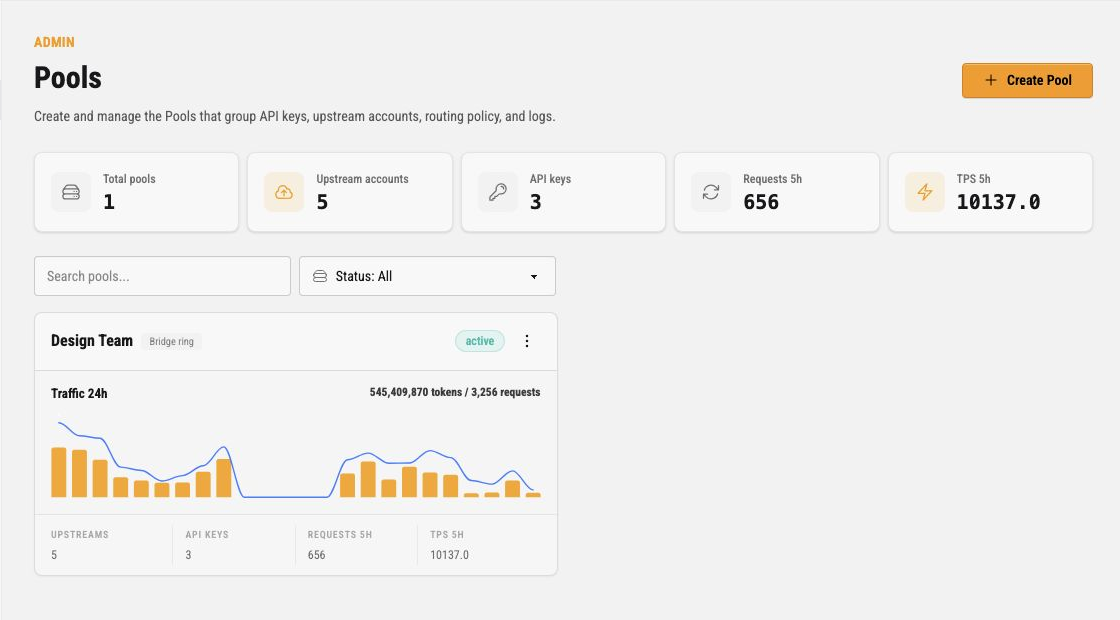
Section titled “Page Metrics”The metric cards at the top summarize the visible Pool scope for the current operator.
| Metric | Meaning |
|---|---|
| Total pools | Count of Pools visible to the operator. Owners can see management Pools. Assigned admins only see Pools in their reporting scope. |
| Upstream accounts | Count of upstream accounts linked to the visible Pools. These are the account identities that may become route candidates if active and eligible. |
| API keys | Count of Pool API keys linked to the visible Pools. These are runtime client credentials, not operator login credentials. |
| Requests 5h | Runtime request count for the last five hours across the visible Pools. |
| TPS 5h | Tokens per second for the same recent usage window. It is computed from total tokens divided by cumulative request latency, so it is a throughput signal, not a wall-clock request rate. |
The search box filters Pool cards by text. The status dropdown filters the card list by Pool lifecycle state.
Pool Cards
Section titled “Pool Cards”Each Pool appears as a card. The card header contains the Pool name, the routing strategy badge, the lifecycle status badge, and the dotted action menu.
The lifecycle states are:
| State | Meaning |
|---|---|
| Active | The Pool can receive new runtime work if it has an active API key and eligible upstream assignments. |
| Disabled | The Pool stays configured and visible for operations, but should not admit new runtime work. Reactivate in the card menu makes it active again. |
| Archived | The Pool is kept for historical reporting and cleanup. Hard deletion is only available after archive. Reactivate in the card menu makes it active again; admin Pool assignments that archiving revoked stay revoked. |
The routing strategy badge shows the ordering policy used after hard eligibility checks. For the default Bridge ring strategy, Codex Pooler spreads requests across eligible upstreams while still honoring continuity, prompt-cache locality, quota evidence, and recent demotions.
Traffic 24h
Section titled “Traffic 24h”The chart shows Pool traffic for the last 24 hours:
- orange bars show token volume by hour
- the blue line shows request count by hour
- the total above the chart shows 24 hour token and request totals
- the empty state appears when no traffic exists in that window
The chart is a quick health and shape check. Use it to spot traffic bursts, quiet periods, and obvious changes in request volume before moving to Stats or Request logs for deeper investigation.
Card Footer Links
Section titled “Card Footer Links”The footer is a compact navigation row for the main related records.
| Footer label | Meaning | Link target |
|---|---|---|
| Upstreams | Active upstream accounts assigned to the Pool | the Upstreams page filtered to this Pool |
| API keys | Pool API keys assigned to the Pool | the API keys page filtered to this Pool |
| Requests 5h | Runtime requests received by this Pool during the last five hours | the Request logs page filtered to this Pool |
| TPS 5h | Tokens per second over the recent usage window | informational only |
The labels link to the related page. The numeric values stay plain text so the card reads like a metric summary.
Action Menu
Section titled “Action Menu”Open the dotted menu on a Pool card for management actions.
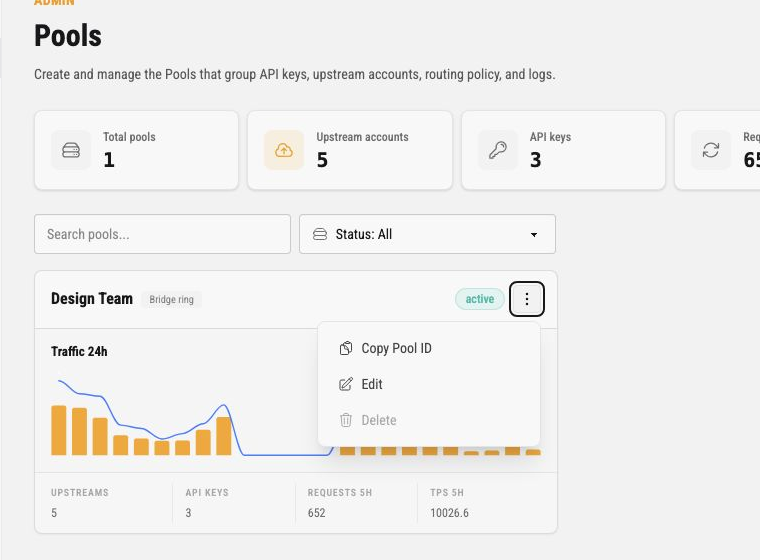
The current actions are:
| Action | What it does |
|---|---|
| Copy Pool ID | Copies the Pool UUID to the browser clipboard. Use this for support, logs, or exact filters. |
| Edit | Opens the Pool configuration dialog for lifecycle, routing, upstream assignments, and API key assignments. Available for an active Pool; reactivate a disabled or archived Pool first. |
| Reactivate | Shown for a disabled or archived Pool. Makes the Pool active again, so its API keys can admit new runtime work, and records a Pool status audit event. Admin Pool assignments that archiving revoked are not restored; assign them again from the Operators page. |
| Delete | Hard-deletes a Pool only after it is archived and you have typed its slug, together with its request history, sessions, API keys and upstream assignments. Active and disabled Pools cannot be hard-deleted from the card menu. A Pool with a small history is deleted at once. A Pool with a large history is handed to a background job: the card shows deleting, Delete and Reactivate stay disabled, and the Pool disappears when the job has removed its history. If the job gives up, the card shows deletion failed, and deleting again resumes where it stopped. The Pool deleted audit event is recorded only when the Pool is actually gone. |
Use archive before delete when you need to retire a Pool but keep historical request and audit metadata available.
Create a Pool
Section titled “Create a Pool”Click Create Pool to open the Pool configuration dialog.
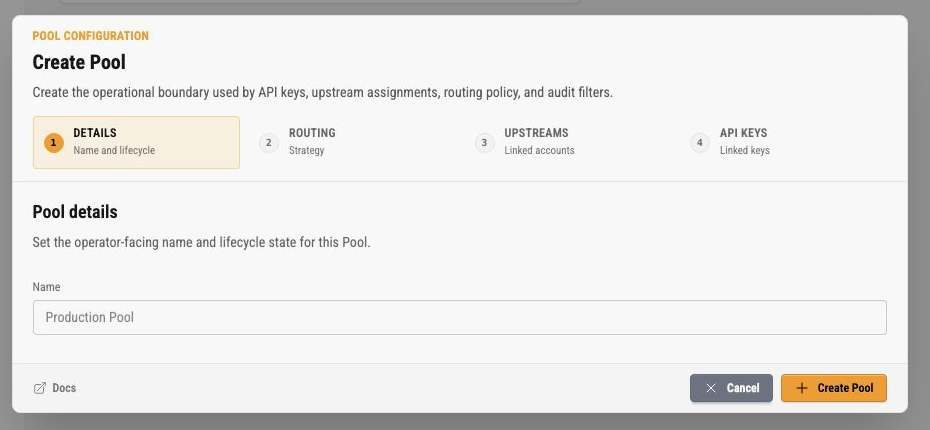
The create dialog is a four-step wizard:
- Details
- Routing
- Upstreams
- API keys
The Details step asks for the operator-facing Pool name. New Pools start from the create defaults; lifecycle status is edited later from the edit dialog.
The dialog footer includes a Docs link on the left and the action buttons on the right. Cancel closes the dialog without saving. Create Pool submits the current configuration.
Routing Step
Section titled “Routing Step”The Routing step controls how the Pool chooses among eligible upstream accounts.
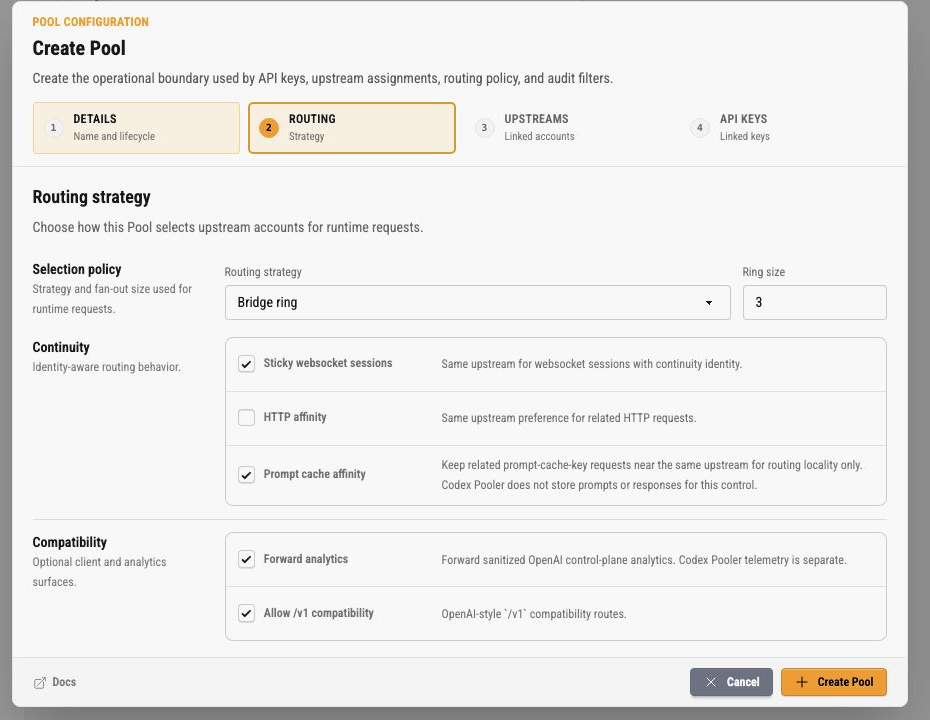
Routing settings are split into selection policy, continuity, and compatibility.
Selection Policy
Section titled “Selection Policy”Routing strategy chooses how eligible upstreams are ordered. Strategy does not bypass eligibility. An upstream must still be active, assigned to the Pool, compatible with the requested model and route shape, and usable according to quota and health evidence.
Ring size controls how many ordered upstreams Codex Pooler prepares for a request. A ring size of 3 means the route plan can include up to three eligible upstreams. If the first attempt fails in a retryable way, Codex Pooler can try the next eligible upstream in that plan.
Continuity
Section titled “Continuity”Sticky websocket sessions keeps websocket work with the same upstream when a continuity identity exists. This protects reconnects and session-bound websocket state.
HTTP affinity gives related HTTP requests a same-upstream preference. It is a preference, not permission to use an ineligible account.
Prompt cache affinity keeps related prompt-cache-key requests near the same upstream for routing locality. Codex Pooler uses this as a routing input only. It does not store prompts or responses for this control.
Compatibility
Section titled “Compatibility”Allow /v1 compatibility enables OpenAI-style /v1 compatibility routes for clients that use that surface.
Request compression enables per-Pool request compression. It is off by default and applies only to upstream-bound Responses tool-output payloads on eligible request routes. It is request-side only: Codex Pooler does not store raw outputs, does not store upstream response bodies, and does not implement CCR/retrieval.
Eligible families are backend and public Responses, translated chat completions, direct backend compact routes, and websocket response.create dispatches. Multipart, file, audio, image, admin, MCP, usage, and other non-Responses requests are not eligible. Public /v1/responses/compact remains unsupported.
Within eligible tool outputs, valid JSON objects or arrays can be minified even when they are surrounded by ordinary explanatory text. Every surrounding byte stays unchanged. Quoted JSON-looking text, malformed or over-limit spans, and protected exact-output tool results remain pass-through.
Recognized same-frame command-backed file reads remain byte-for-byte pass-through before output-range lookup, content detection, or any compression strategy. The bounded read grammar permits direct cat, nl, head, tail, and print-only sed reads, plus one nl-to-print-only-sed pipeline. Function-call outputs match call_id; native local-shell outputs match call_id or id. Duplicate, cross-kind, or conflicting identifiers protect the original output, while malformed or unrecognized commands retain existing behavior.
Request compression is fail-open. If scanning, token counting, rewriting, or limits fail, the original request body is sent upstream and request logs record a safe payload_compression status and reason. JSON bodies over 1 MiB skip before scanning, and a dispatch processes at most 50 output candidates. Token counting is local and in-process using tokenizer data shipped with the application; it does not call OpenAI or load a local model.
Request logs may show compression savings when safe aggregate data exists. The UI prefers saved token count and token savings percent, then falls back to saved bytes and byte savings percent when token counts are unavailable.
Allow image generation controls these exact authenticated POST routes:
/backend-api/codex/images/generations/backend-api/codex/images/edits/v1/images/generations/v1/images/edits
It is on by default for new Pools and for existing routing rows that do not yet
have a saved value. When disabled, the runtime returns 403 with code
image_generation_disabled after Pool API-key authentication, before request
body decompression, parsing, coercion, admission, or upstream dispatch. This
keeps a disabled Pool from accepting image payloads at the parser boundary.
Upstreams Step
Section titled “Upstreams Step”The Upstreams step selects which active upstream accounts are available to the Pool. A checked upstream becomes a Pool assignment. Runtime routing still applies eligibility checks before using it.
Assign more than one upstream when you want load distribution, fallback, quota flexibility, or account maintenance without moving clients to a different API key. Keep an upstream unassigned when it should not receive work for that Pool.
When a saved edit changes upstream assignments for an active Pool, Codex Pooler enqueues an immediate asynchronous catalog sync for that Pool so model source metadata can refresh without waiting for the 30-minute scheduler. The sync does not bypass runtime eligibility checks or change the routing state held by in-flight requests or already-open streams.
Sharing One Upstream Across Pools
Section titled “Sharing One Upstream Across Pools”Assigning the same upstream account to more than one Pool is supported and is usually what you want: it pools quota and gives each Pool fallback without a dedicated account.
Nobody can read anyone else’s prompts. Codex Pooler never stores prompts, and nothing described below gives any caller a way to retrieve, list or reconstruct content they do not already have. If you are evaluating whether this is safe to use, that is the answer.
The detail worth knowing is about the provider’s prompt-prefix cache, which exists to make repeated prefixes cheaper. That cache matches on content, and it is not partitioned per upstream account the way you might expect: measured against a provider in September 2026, content sent under one upstream account came back as cached input tokens under a different one. Those accounts each had their own account and user identifiers; whether the provider also groups them under one organisation is not something Codex Pooler can see, so treat the boundary as the provider’s to define. Either way this is the provider’s own behaviour and it applies to anyone sharing accounts, with or without Codex Pooler in front of it.
The only thing that behaviour exposes is a yes-or-no answer about bytes you already hold. If you send a prefix and the response reports cached input tokens, you learn that those exact bytes had been sent before by someone sharing the account. You had to possess them to send them, so you learn nothing about content you did not already have, and there is no way to go from a cache hit to anything you were not already holding.
Where that could matter in practice is a shared artifact rather than someone’s typing: if you already have a document, a system prompt or a code file, you could use this to test whether it had previously been sent through the same account. Guessing a colleague’s prompt is not a realistic use of it — provider caches match long exact prefixes, so you would need the text verbatim first.
For a single team or operator this is simply an efficiency and needs no action. If your Pools are separate customers or separate legal entities, and even that yes-or-no answer about a shared file is more than you want between them, give each its own upstream accounts. No Codex Pooler setting changes it, because the cache lives at the provider.
API Keys Step
Section titled “API Keys Step”The API keys step selects existing Pool API keys assigned to the Pool. Assigning a key lets that client credential use this Pool. Creating or rotating the raw key happens on the API keys page, where the raw secret is shown only once.
Use separate Pool API keys for separate clients, environments, or automation boundaries. That makes rotation and investigation easier without changing the Pool’s upstream configuration.
Edit a Pool
Section titled “Edit a Pool”Instance owners use the card menu’s Edit action to update an existing Pool. That dialog includes the owner-only Details, Routing, Upstreams, API keys, and Models steps.
An assigned instance admin sees a separate Models action for an assigned active Pool. It opens only the Models panel, where the admin can review and save serving modes for that Pool. Details, routing, lifecycle status, upstream assignments, API-key assignments, and delete actions are not exposed through this path. The save is guarded by the assigned Pool scope and records the normal model-serving audit event.
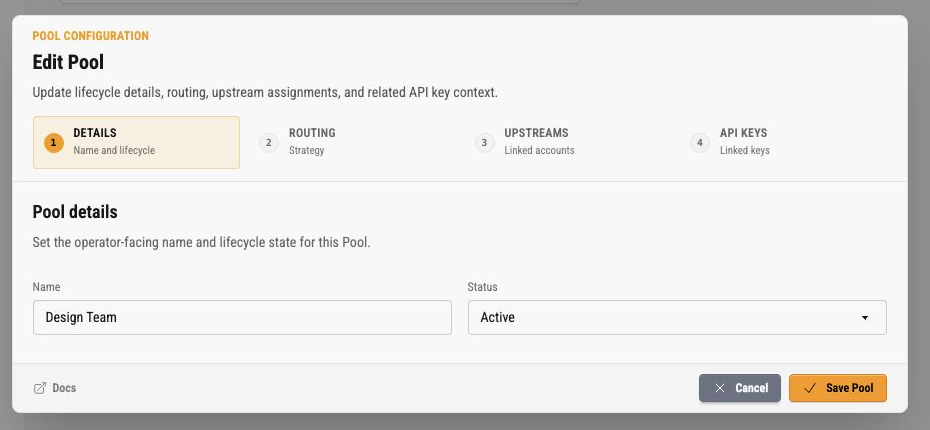
The edit Details step includes the Pool name and lifecycle status. Status is the safest way to retire or pause a Pool without deleting historical metadata. The dialog edits active Pools only: to bring back a disabled or archived Pool, use Reactivate from its card menu, then edit it.
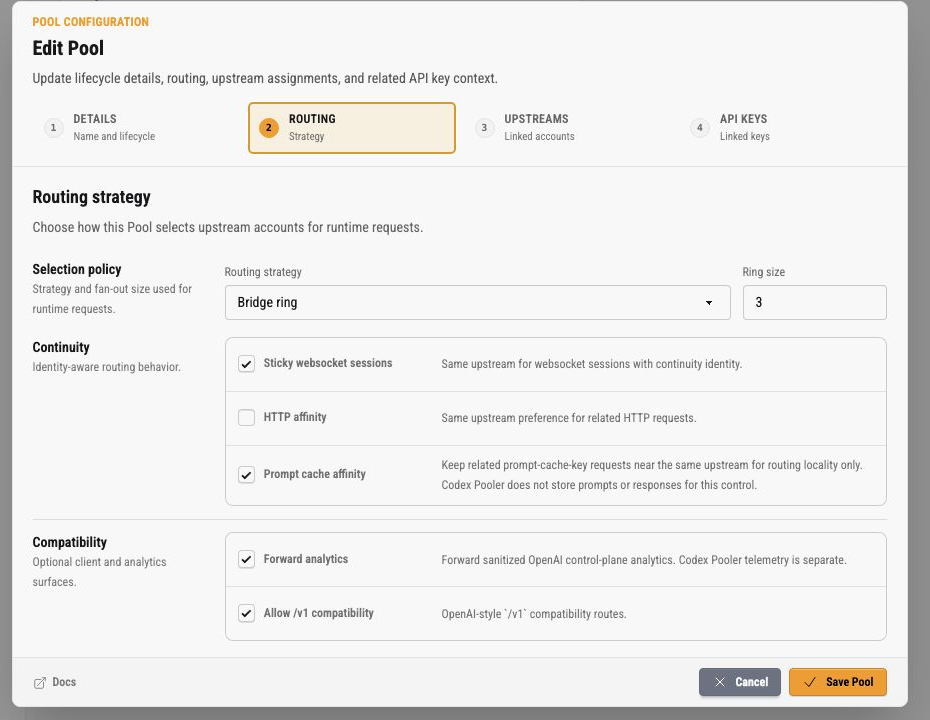
The edit Routing step uses the same routing controls as create. Changes apply to new runtime work after the Pool is saved. In-flight requests and already-open streams keep the routing state they started with.
Model Serving Modes
Section titled “Model Serving Modes”The owner Edit dialog and the assigned-admin Models dialog both use the Models panel to control the serving mode for each model available to the Pool. A saved choice belongs to one Pool-model pair. The same model can therefore use different modes in different Pools, while each Pool continues to expose one client-visible model id.
For what Lite and Full actually change on the outgoing request, and what they deliberately leave alone, see Responses Lite and Full.
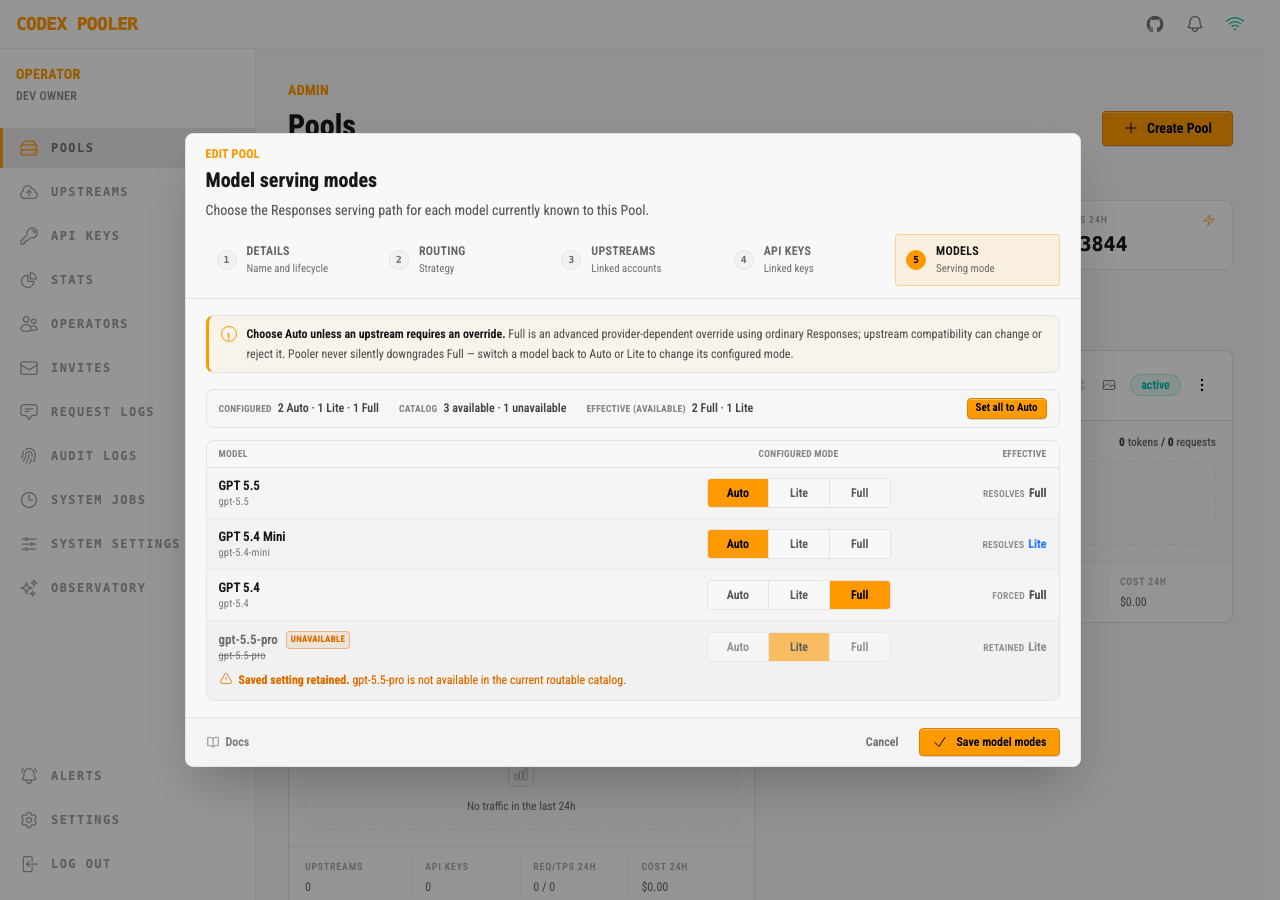
Use Auto unless a provider-specific requirement calls for an override:
| Mode | Behavior | Operator guidance |
|---|---|---|
| Auto | Uses Lite when any health-level routable catalog source reports literal true for Lite support. Routable means active, eligible, health-active, past cooldown, and attached to a visible upstream identity; quota availability for this individual turn is evaluated later and does not change the Pool-model dialect. False, missing, or malformed source values do not count; otherwise the effective mode is Full. For legacy catalog rows without a source-assignment map, a literal top-level use_responses_lite: true selects Lite; every other legacy value selects Full. | Recommended. It follows current catalog evidence as assignments and provider capabilities change. |
| Lite | Forces the Lite backend request shape for this Pool-model pair. | Use when the selected provider requires the Lite-compatible request shape. |
| Full | Preserves ordinary Responses options such as the client’s parallel_tool_calls value and removes the Lite marker. | Advanced and provider-dependent. An upstream can reject it now or after a provider change. |
If a catalog refresh no longer returns a model, an existing Lite or Full override stays visible as an unavailable row and is marked Saved setting retained. Selecting Auto changes that row to Selecting Auto removes this saved override when you save. Saving removes only that explicit override; sibling model overrides, catalog rows, and upstream assignments remain unchanged. Reopen the Models panel after saving to see the refreshed set of retained and available rows.
Codex, OpenCode, and other supported public OpenAI-compatible clients keep their existing Pool API key, base URL, configuration, and model id. Codex Pooler changes only the backend request selected for that Pool-model pair. GET /v1/models remains unchanged and does not expose serving-mode fields; public POST /v1/responses/compact remains unsupported.
Masked Images edits need an eligible Full Responses host with image-input support. Auto can supply one when the catalog resolves that host to Full; there is no need to force every model to Full. An exact requested model explicitly configured Lite remains unavailable for masked edits, and the adapter does not override that setting. Without an eligible Full host, masked edits return 400 unsupported_parameter (mask) before dispatch or accounting reservation. Unmasked native Images requests continue to use their existing route. See Responses Full and Lite.
Full never silently downgrades. An ordinary Responses HTTP failure under the explicit Full override keeps the upstream status and a server-owned message, and on a non-rate-limit 4xx it relays the same bounded rejection type, code, and param the attempt already records; the provider message, body, and extra fields are not returned. Request-log detail drawers show the configured, effective, and source labels when each request or attempt has a complete validated snapshot; a non-rate-limit 4xx is classified as upstream_status, a 429 as upstream_rate_limited, and an ordinary 5xx as upstream_status. The error code does not record the serving mode, so the same provider rejection carries the same code under Auto, Lite, and Full, and the mode is read from the serving-mode snapshot instead. They do not retain the upstream error text, request payload, prompt, response body, or credentials. Auto, Lite, compact or unrelated routes, and established model-unavailability responses keep their existing response behavior. Review provider support, then explicitly select Auto or Lite and retry as a new request or turn.
Serving modes are database-backed Pool configuration. There is no global environment variable or Helm value for them.
Codex Catalog Entries Left Out
Section titled “Codex Catalog Entries Left Out”Codex reads the whole Pool catalog as one document: a single entry it cannot decode (a required field missing or null, an unknown enumeration value, a fractional number where it expects an integer) makes it discard every entry and fall back to the catalog bundled with the Codex release. For Codex releases whose catalog decoder Codex Pooler has been verified against, 0.154.0 through 0.156.1, the catalog is checked entry by entry and an entry that release cannot decode is left out, so the client keeps every other Pool model. The version is the one in the Codex User-Agent (codex_cli_rs/0.156.1 (...), Codex Desktop/0.155.0-alpha.16 (...)), which Codex sends on the catalog request and on every turn; the client_version query parameter is not read. Prereleases count by their whole version, so 0.155.0-alpha.16 is judged as 0.155.0. Newer and older releases, /v1/models, and clients whose User-Agent is not a Codex build’s receive the catalog unchecked, because the decoder rules are not known to hold for them.
A left-out model is not advertised to that client, so it is missing from the Codex model picker. It stays routable: a request that names the model is routed and served as usual, because routing does not read the served catalog.
Each omission is logged as a warning on every catalog fetch that leaves an entry out:
codex catalog entry left out: the requesting client cannot decode it pool_id=<pool id> model=<model id> fields=<field paths>The line names the Pool, the model, and up to ten field paths that fail, never a value. A model id outside letters, digits, ., _ and - is shown as a sha256: fingerprint. A left-out entry usually means the provider catalog changed shape or a synced entry is incomplete. The next catalog sync replaces the entry; if the warning persists after it, compare the named fields with a current Codex release before changing anything else. Codex Desktop and the IDE extension report the version of the Codex core they bundle, so the same rule applies to them.
Operational Checklist
Section titled “Operational Checklist”When a Pool is not behaving as expected, check it in this order:
- confirm the Pool status is
active - confirm the client is using an active Pool API key assigned to this Pool
- confirm the Pool has active upstream assignments
- confirm those upstreams are not paused, disabled, archived, or reauth-required
- confirm the requested model and route shape are supported by the assigned upstreams
- inspect recent Requests 5h, TPS 5h, and Traffic 24h for changes in load
- open Request logs filtered from the card footer for request-level metadata
- for request-compression questions, inspect
payload_compressionstatus, reason, route class, candidate counts, and savings display in the Request log row - for explicit Full failures, inspect
upstream_statusfor non-rate-limit 4xx and for 5xx orupstream_rate_limitedfor 429, the upstream status, and the three bounded serving-mode labels, which are what identify the failure as a Full one, before selectingAutoorLite - check Audit logs when a Pool, upstream assignment, API key, routing setting, or model serving mode changed recently
If all upstreams fail eligibility, routing cannot use them even if the Pool card looks active. The card shows Pool-level configuration, while final routing also depends on upstream status, model support, quota evidence, route health, and continuity constraints.