API keys
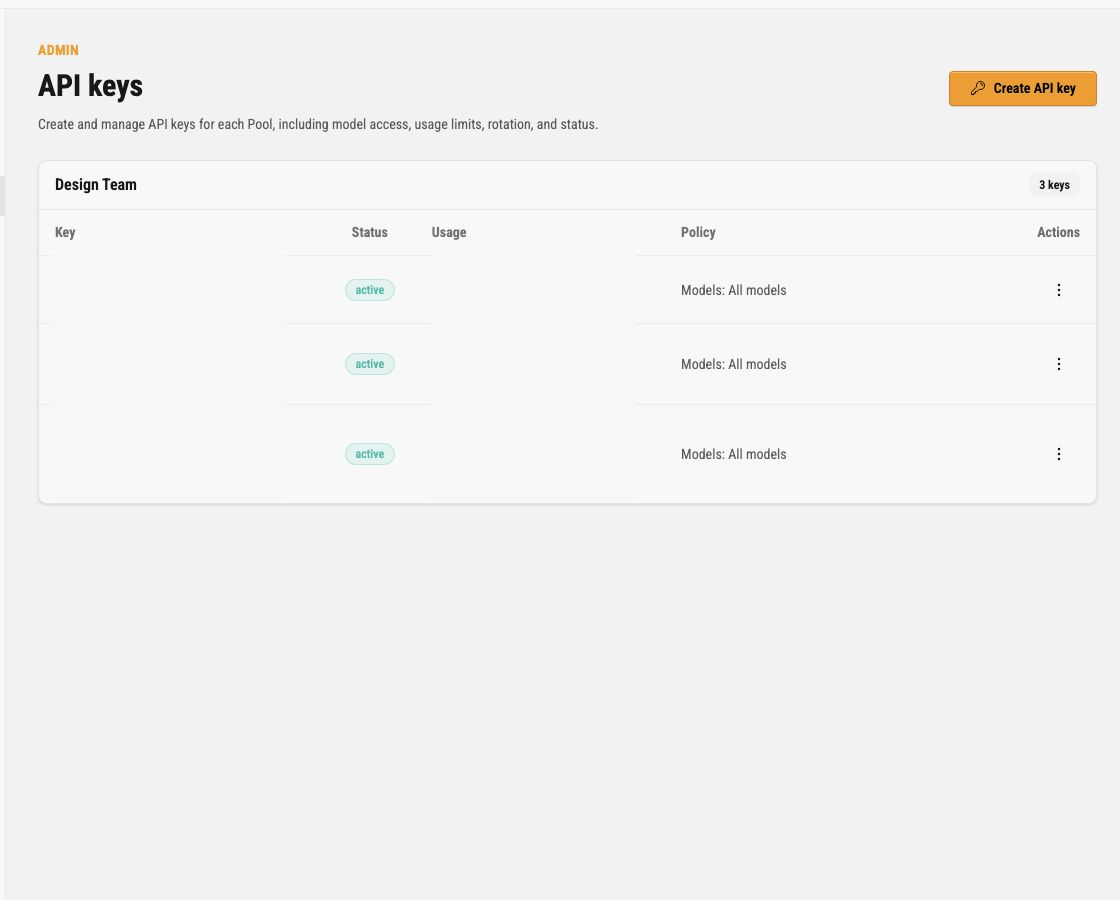
The API keys page is the operator surface for runtime client credentials. A Pool API key lets a client send requests through one Pool. It does not represent an upstream account, and it is not an operator login credential.
Use this page when you need to answer:
- which client credentials exist for each Pool
- whether a key is active, paused, or revoked
- which model policy applies to a key
- whether request or token limits are configured
- when a key was last used or expires
- when a key needs rotation, pause, revoke, or deletion
The page is a lifecycle and policy registry, not an analytics page. It shows display names, safe key prefixes, Pool grouping and filtering, status, dashboard-access state, last-used and expiry state, model-policy summaries and warnings, operator notes, and action menus. It does not show usage totals or charts, and it does not show raw Pool API keys after the one-time secret dialog is closed.
Use the API Key Observatory for read-only analytics scoped to one API key. Use the admin Stats page for Pool-level aggregate request, token, and cost analytics, and Request logs for request-level investigation, including API key context, outcomes, and available settled usage metadata.
What an API Key Controls
Section titled “What an API Key Controls”A Pool API key is the bearer credential a runtime client uses for Codex Pooler routes. The key authorizes the client into one Pool. The Pool then decides which eligible upstream account receives the request.
An API key controls:
- the owning Pool
- display name and operator notes
- lifecycle status, such as active or paused
- optional expiry
- allowed model policy
- optional enforced request fields
- default request and token limits
- one optional model-scoped limit override
- an optional key-wide active request limit
API key policy does not bypass Pool routing. The Pool still needs active upstream assignments, compatible models, fresh credentials, and usable quota evidence.
Pool Registries
Section titled “Pool Registries”Keys are grouped by Pool. Each Pool registry has a compact identity rail and a list of credential records that adapts from stacked mobile details to a dense desktop grid.
| Record area | Meaning |
|---|---|
| Credential | Operator display name and safe key prefix. The prefix helps identify a credential without exposing the full bearer token. |
| Status | Lifecycle state for the client credential. Active keys can authenticate new runtime requests; paused or revoked keys should not. |
| Lifecycle | Last-used and expiry state. These help identify credentials that need review or retirement, without presenting traffic totals. |
| Policy | Short model-policy summary, such as all models or selected models. A warning identifies configured models that are not currently available to the Pool. |
| Actions | Dotted menu for edit, pause, resume, rotate, revoke, and delete actions. |
Operator notes appear behind the small information icon when present. Keep notes operational and sanitized; do not store secrets, customer content, or raw keys in notes.
Create API Key
Section titled “Create API Key”Click Create API key to open the policy wizard.
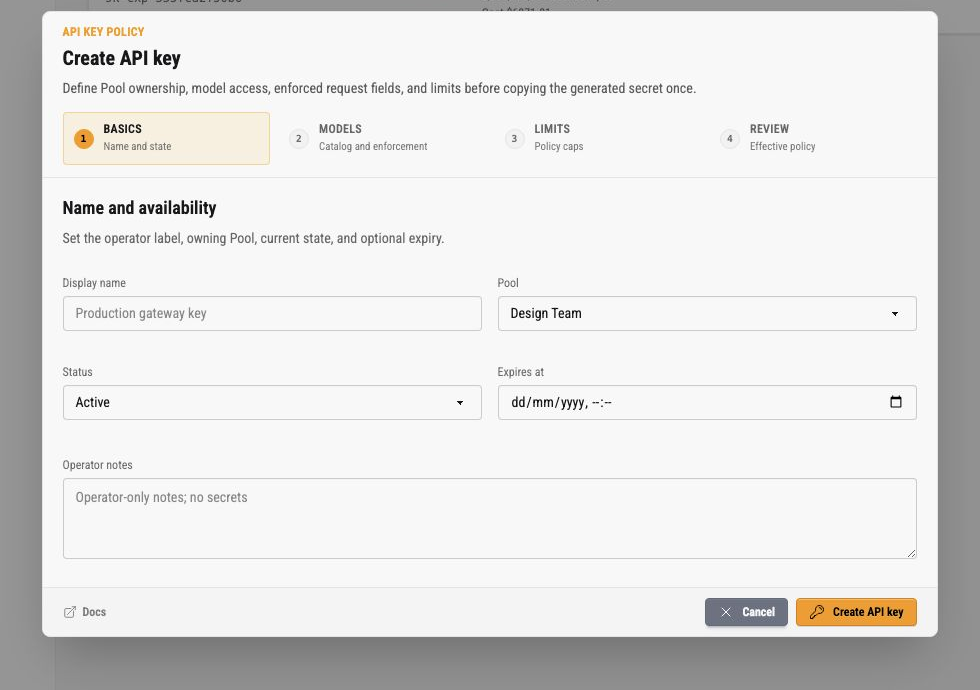
The wizard has five sections:
- Basics
- Models
- Enforcement
- Limits
- Review
The dialog footer keeps Docs on the left and actions on the right. Cancel closes without creating a credential. Create API key submits the policy and then shows the raw key once.
Basics
Section titled “Basics”Basics defines the operator label, owning Pool, status, optional expiry, and operator notes.
Use one key per client, environment, or automation boundary. Separate keys make rotation and request investigation easier because Request logs retain the key context for each recorded request.
Status choices are:
| Status | Meaning |
|---|---|
| Active | The key can authenticate new runtime requests for its Pool. |
| Paused | The key remains configured but should not admit new runtime requests. |
Expiry is optional. Use it for temporary automation or time-bounded access. Leave it blank for long-lived client credentials that are rotated operationally.
Dashboard access
Section titled “Dashboard access”Dashboard access is a separate, disabled-by-default capability on the API key. Enable it in the Basics step when the key holder should be able to open the read-only API Key Observatory. The same policy wizard manages this setting; there is no separate dashboard settings page.
This capability does not replace runtime API-key permission. Runtime requests still use the key’s active status, Pool, model policy, limits, expiry, and the Pool’s routing eligibility. It also does not grant an instance-owner or instance-admin browser session, access to /admin/*, or visibility into other keys.
Owners can manage the setting for their visible Pools. Instance admins need the existing pool_api_key.manage capability for the assigned Pool. The wizard shows the normalized value as Dashboard access: Enabled or Dashboard access: Disabled, and each key card shows a matching badge. The API-key page remains a lifecycle/policy registry: it does not grow usage totals or charts when dashboard access is enabled.
Open the API Key Observatory
Section titled “Open the API Key Observatory”The Observatory has its own browser boundary. It is not part of the instance-admin login flow:
- Open
GET /observatory/login. - Enter the Pool API key in the password-style
Access keyfield and submit the CSRF-protected form toPOST /observatory/login. The credential is accepted only in that form; never add it to a URL or query string. - A valid active, non-expired key with Dashboard access enabled receives a separate HttpOnly, SameSite
Laxbrowser session and redirects toGET /observatory. - The Observatory page can be ended with
DELETE /observatory/logoutfrom itsLog outcontrol. Logout removes the dashboard session and clears the browser cookie.
The dashboard session lasts at most 14 days, does not renew its expiry while idle or active, and is limited to 10 concurrent sessions per key. The database stores only a hash of the browser session token. The raw Pool API key is not persisted as dashboard session data, rendered in the dashboard, or included in logs. Login attempts that fail because a key is missing, malformed, paused, revoked, expired, not enabled for Dashboard access, or attached to an inactive Pool use the same generic failure message.
Observatory contents and privacy
Section titled “Observatory contents and privacy”The authenticated dashboard is read-only and scoped to the one API key used to sign in. It offers 1h, 5h, 24h, and 7d windows with:
- success, cache, cost, throughput, and latency summaries
- a model distribution based on settled token totals
- Traffic buckets with fresh and cached token values, plus interval and cumulative views
- at most 12 recent outcomes showing time, model, sanitized endpoint class, status, latency, tokens, and cost
Cost values are reporting estimates or settled accounting values, not provider invoices. Partial accounting, missing pricing, no activity, paused refresh, disconnection, and temporary read errors are shown as explicit states rather than invented totals.
Dashboard data is metadata-only. It excludes prompts, completions, file or media contents, request and response bodies, headers, cookies, bearer credentials, raw idempotency keys, IP addresses, user agents, upstream identities, Pool controls, other API keys, and raw error text.
Models
Section titled “Models”The Models step chooses model scope and optional enforced request fields.
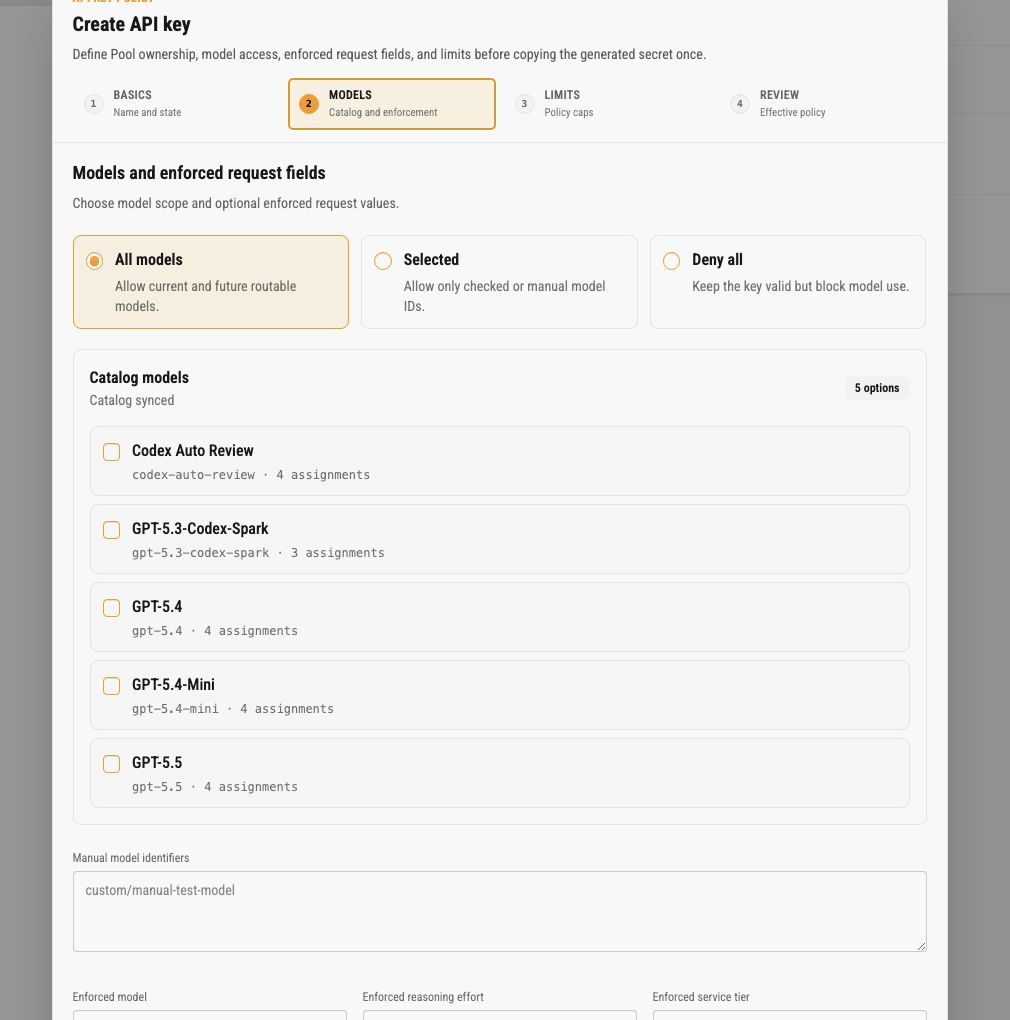
Model modes are:
| Mode | Meaning |
|---|---|
| All models | Allows current and future routable models for the Pool, subject to upstream eligibility. |
| Selected | Allows only checked catalog models and any manual model identifiers saved on the key. |
| Deny all | Keeps the key valid but blocks model use. Use this for staged credentials or emergency containment. |
Catalog models are derived from current routable model metadata. Manual model identifiers support controlled exceptions when a model is not yet present in the catalog.
A request for a model the key may not use returns 400 model_not_allowed with invalid_request_error and param: "model" before reservation or upstream work, on every route and transport. The status is 400, like the Codex backend’s own refusal of a model the account cannot serve, because resending the same request cannot pass: the Codex client ends the turn on a 400, while it resends a 403 several times and then switches the session from websocket to HTTPS. OpenAI SDKs retry neither status.
Enforced request fields let the key override selected client request values:
- enforced model
- reasoning policy
- enforced service tier
The reasoning policy offers three modes:
- Unrestricted leaves omission absent and preserves any effort the route already accepts. This is the default for keys with neither reasoning value configured.
- Allow up to permits only known efforts through the selected ceiling:
none,minimal,low,medium,high,xhigh,max, orultra. The Pool model’s known levels (the union across the Pool’s assignments) can narrow the result further; the assignment that finally serves may list fewer, so routing prefers an assignment whose own catalog lists the effort, and when no candidate lists it the effort is the upstream’s to refuse. An omitted request uses the permitted model default, or the highest permitted known level. - Always use applies one exact effort to every request. Existing keys that already have an enforced reasoning effort stay in this mode.
Allow up to rejects rather than changes a disallowed request. An effort above the ceiling, an unknown or custom effort, or an omission with no permitted level returns 400 reasoning_effort_not_allowed before upstream work. Backend Responses and public Responses identify reasoning.effort; Chat Completions identifies reasoning_effort.
none is an explicit configured value. Leaving the policy Unrestricted is different because it leaves client control intact. minimal and ultra are evaluated as their own client-facing values, then backend dispatch rewrites minimal to low and ultra to max, or to the model’s highest listed level when its catalog omits max. none is never a rewrite target and is forwarded unchanged. Safe policy and reasoning summaries can distinguish the requested, applied, and effective values.
Limits
Section titled “Limits”The Limits step separates key-wide concurrency from the default policy and one optional model override.
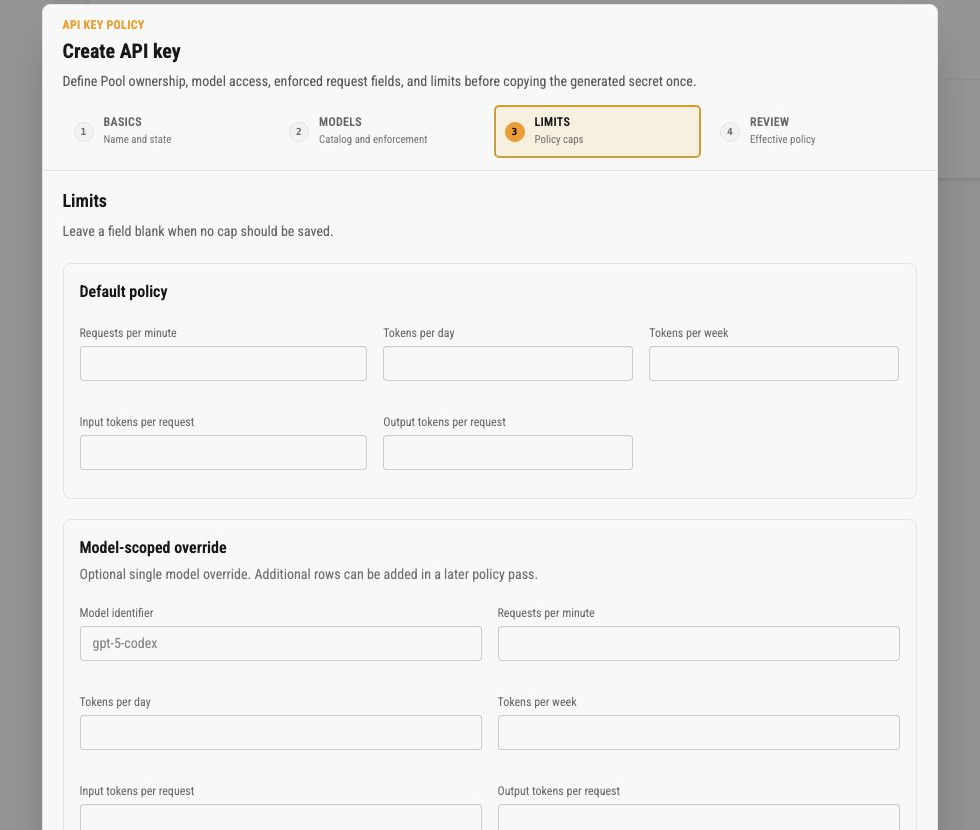
Default policy fields check:
- requests per minute
- tokens per day
- tokens per week
- estimated input tokens per request
- estimated output tokens per request
Leave a field blank when no cap should be saved. A blank limit is different from a zero limit.
The model-scoped override is an optional single-model override. A matching active override replaces the default binding for that request; its blank fields do not inherit default limits. Its thresholds still compare against usage across the whole key, not a separate model allowance. The wizard edits one model override. A key that already has overrides for more than one model, for example one created programmatically, shows the others read-only under Other model overrides. Saving keeps them as they are, and the editable override cannot name a model that one of them already limits. Saving also keeps the key’s stored labels. Policy changes and moving the key between Pools do not reset its budget history.
Active request limit
Section titled “Active request limit”max_active_requests accepts a positive integer. Blank (null) disables it for existing and new keys. It counts outstanding execution reservations across every replica, route, and model using that key, independently of the default or model policy. It is not a count of open connections: idle websockets and accepted work without a reservation use no slot.
Lowering the limit lets existing work finish and refuses new reservations until capacity is available. Replaying the same reserved execution reuses its slot; an eligible retry that creates a new successor needs a new slot. Finishing with unknown usage releases the slot even when a provisional token estimate remains.
Saturation returns retryable 429 api_key_concurrency_limit_exceeded with rate_limit_error. HTTP responses include Retry-After: 1 as minimum backoff advice, not a promise that a slot will be free after one second. Websocket turns receive the corresponding error without requiring the socket to close. Authentication failures remain 401.
Policy limit refusals
Section titled “Policy limit refusals”A request refused by the key’s policy answers api_key_policy_limit_exceeded with the Pooler’s own message on every route and transport, and the request log records the status the client received:
- Windows (requests per minute, tokens per day, tokens per week) that the request fits once they move answer
429withrate_limit_error, because the same request is admitted again once the window moves. The retry hint comes from the window’s own boundary:Retry-After: 60for the minute window, the seconds until the next 00:00 UTC for the daily window, and none for the trailing week. Websocket turns carry the same value asretry-afterin the error event’sheaders. When the window frees no sooner than a minute (daily or weekly), HTTP responses also sendx-should-retry: false, so OpenAI SDKs do not spend their automatic retries within seconds. The hint is advice, not a promise: in-flight work that settles below its estimate can free a window earlier. - Per-request estimate caps (input or output tokens per request) answer
400withinvalid_request_errorand no hint, because resending the same request cannot pass them. The Codex client ends the turn on a400; it resent the403answered before several times and then switched the session from websocket to HTTPS. - A daily or weekly token window whose max is below the request’s own estimate answers the same
400withinvalid_request_errorand no hint, and its message names the request estimate and the max. No later window admits that request, so a429with a reset hint would promise something the Pooler never grants. The request’s estimate is judged against every configured token window before any window’s usage, so an exhausted daily window never announces a reset that a lower weekly max would refuse again. Raise the window or lower the request’s output estimate (see below).
Owner forwarding does not change the answer: a resend chained onto an earlier failed request gets the same refusal as any other request.
Token estimates and budget pressure
Section titled “Token estimates and budget pressure”Input and output fields are admission estimates, not provider-enforced generation limits. The output reservation has a floor of 512 tokens, or 2,048 for opaque context such as a continuation reference; higher accepted request or policy values can increase that estimate. Opaque input cannot be measured completely from the visible payload. A low configured output limit can therefore reject an estimate rather than reduce the upstream response.
The upstream may refuse max_output_tokens. Neither these fields nor the concurrency limit guarantee an absolute per-response token or spend cap. Actual usage can exceed the reservation and is recorded in full; it is never clipped to make a budget appear satisfied. See SDK output-budget behavior.
Daily and weekly admission use three distinct components:
- Known: measured terminal usage, including a measured zero.
- Provisional: the original reservation estimate for attempted work that ended without trustworthy usage, until a known correction replaces it or its original terminal time leaves the window. Proven pre-attempt failures add no provisional consumption.
- Pending: every outstanding reservation, including work admitted before the current window began.
Effective token pressure is their sum. Daily usage starts at midnight UTC; weekly usage covers the trailing seven days. A late correction keeps the original terminal attribution time and replaces provisional pressure once. Releasing a reservation cannot subtract another request’s consumption. The remaining budget reflects effective pressure; measured token and cost reports exclude pending and provisional estimates. Costs calculated from measured usage and a pricing snapshot are reporting estimates, not provider invoices or proof of subscription quota charges.
Requests per minute count each committed execution reservation once at its original admission time, with no refund after admission, including a later pre-attempt failure. Denials before reservation count zero. Corrections do not move this counter, and replaying the same reservation does not increment it again.
Review
Section titled “Review”The Review step shows the normalized effective policy before saving, including the selected Pool name, lifecycle settings, model access, enforced values, and configured limits.
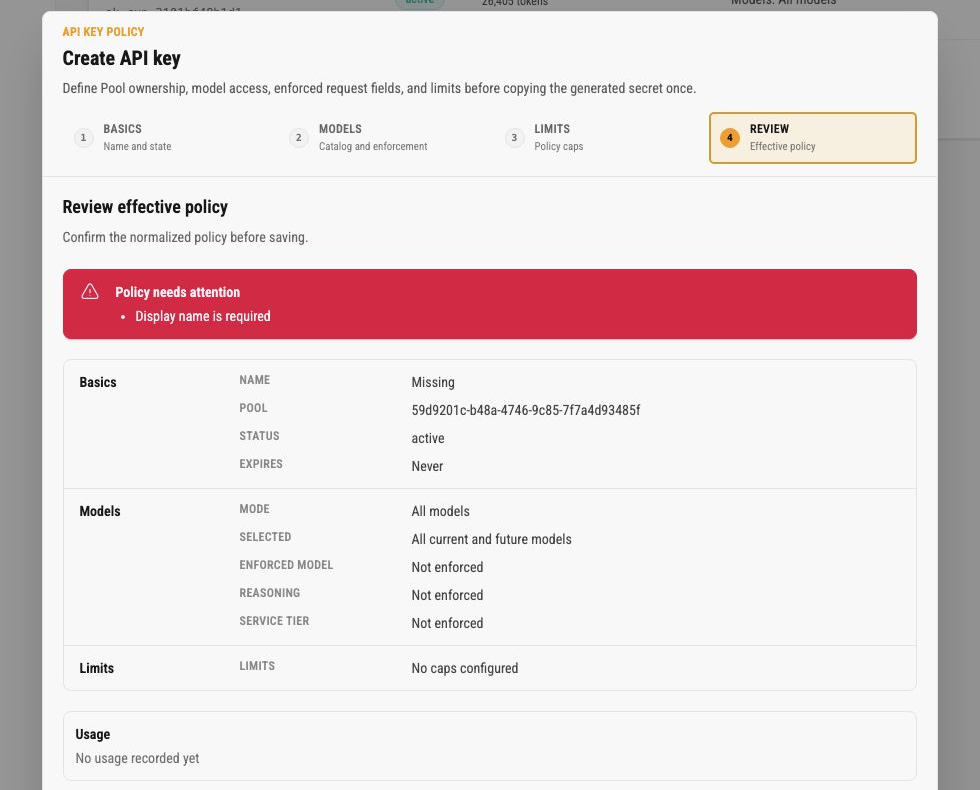
Resolve review errors before saving. The submit button stays disabled when required policy data is missing. The review summary is useful because it shows what the key will actually enforce after normalization, not only what the operator entered on the previous steps.
Review does not show request, token, or cost totals. Open the Observatory for one-key analytics, Stats for Pool-level aggregates, or filter Request logs when you need to investigate recorded traffic.
One-Time Secret Dialog
Section titled “One-Time Secret Dialog”After a key is created or rotated, Codex Pooler shows the raw bearer token exactly once. Copy it before closing the dialog.
Future views only show the safe prefix. If the raw value is lost, rotate the key and update the client with the new value. Do not store raw keys in operator notes, screenshots, tickets, chat, request logs, audit comments, or public docs.
The Observatory login accepts the raw key only for the form exchange. It creates a separate browser session and does not make the raw value available again. Treat the key as a one-time secret at creation or rotation and keep it in the client or password manager that owns the runtime integration.
Action Menu
Section titled “Action Menu”Open the dotted menu on a key row for lifecycle actions.
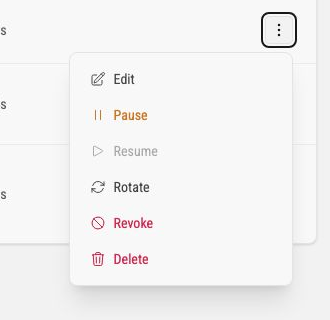
The current actions are:
| Action | What it does |
|---|---|
| Edit | Opens the same policy wizard for an existing key. Stored secret material is not shown. Moving the key to another Pool or changing its expiry also affects connections already open with it. See Responses WebSocket lifecycle. |
| Pause | Disables new runtime authentication for an active key while keeping the key configured. |
| Resume | Returns a paused key to active authentication. |
| Rotate | Creates a new raw bearer token for the same key record and shows it once. Update clients immediately. The key keeps its identity, audit trail, and Request log attribution. |
| Revoke | Marks the key revoked. Revoked keys cannot be edited or resumed. Revocation stops new authentication at once; a request already running finishes. See Responses WebSocket lifecycle. |
| Delete | Opens a confirmation dialog that requires the key prefix. Delete permanently removes the key. Request history is retained under its Pool without a link to the deleted key. Connections still open with the key close as well. A key with a large request history is revoked at once and removed by a background job: its row shows deleting and Delete stays disabled until the job has detached the history and removed the key. If the job gives up, the row shows deletion failed, and deleting again resumes. The API key deleted audit event is recorded only when the key is actually gone. See Responses WebSocket lifecycle. |
Prefer pause for temporary containment, rotate for suspected exposure, revoke for permanent credential retirement, and delete to permanently remove the credential. Deleting a key does not purge request history.
Responses WebSocket lifecycle
Section titled “Responses WebSocket lifecycle”For supported Responses WebSocket routes, every change that makes a Pool API key unusable also ends the WebSocket connections already open with it:
- pausing or revoking the key
- deleting the key, or deleting the archived Pool it belongs to
- the key reaching its expiry time
- disabling or archiving the key’s Pool
- moving the key to another Pool
- rotating the key
- editing the key’s allowed models, enforced model, reasoning effort policy, or enforced service tier
The first four block new runtime authentication. The last three do not: a moved key authenticates in its new Pool, a rotated key authenticates with its new secret, and an edited key authenticates under its new policy. A connection opened before the change still carries what it read when it opened, so it is closed as well. In every case the existing connections close with policy code 1008 and the reason api key is no longer active. The cluster notification only prompts that close; it is not the authorization authority.
A policy edit closes the key’s connections whether it narrows or widens what the key may use, because the open connection judges each request against the policy it read when it opened. An edit that changes none of those fields keeps connections open: a rename, the Dashboard access switch, request and token limits, per-request caps, and the active-request cap. Limits and caps are read again for every request, so a new limit applies to the next request on an open connection without closing it. Saving the form without changing the policy does not close anything.
Current Codex clients treat that close like any dropped connection: the next request is retried on a new connection without showing a message, and it sends the full conversation instead of continuing from the previous response. A request refused by the new policy then returns its usual error, such as model_not_allowed.
Before later work is admitted, a durable fence reads the key’s persisted status, revocation generation, and expiry, together with its Pool’s status. A move, a rotation, and a policy edit that changes one of the fields above advance the revocation generation, so authorization from before the change no longer matches. A key that no longer exists fails the same fence. If a socket misses or receives a delayed cluster notification, its next frame is still rejected and the connection closes without starting that work. That includes response.processed acknowledgements: one sent after the change is not passed on to the upstream account.
Expiry sends no notification, because nothing is edited when the clock passes the expiry time. A connection whose key has an expiry time checks the key again when that time arrives and closes then, even if the client sends nothing. Editing the expiry, including moving it into the past, prompts the same check immediately.
Only work admitted before the disabling change won the durable ordering may drain and finish once. Queued and later frames do not start after the change takes effect.
That drain has no deadline of its own. A request already running when the change landed finishes under whatever timeout already governs it, and the connection closes when it ends, so the interval is the length of that one request rather than a separate bound you can configure. Everything else stops immediately: the key authenticates nothing new, later frames on an open connection are ignored rather than queued, and work already waiting behind the running request is discarded without being started.
Draining rather than cutting is deliberate. Ending a response mid-stream would leave the client with a truncated answer and no terminal, and would leave its accounting unbalanced. If you are revoking a credential you believe is compromised and need certainty that nothing is still running, watch for the connection to close rather than assuming revocation alone ended it.
Delete retains request history, including the record of a request that is still running, with the deleted key’s association cleared. A request authenticated just before deletion is rechecked before reservation; if deletion wins that ordering, the request is rejected without upstream work and its rejection remains in the Pool’s request history.
Resuming a paused key, re-enabling its Pool, or moving its expiry later makes it eligible for new authentication, but it does not reopen an existing socket that was closed or marked for closure. The client must establish a fresh WebSocket connection. After a move, that fresh connection authenticates in the key’s new Pool.
During a rolling update, full cluster protection begins only after all application replicas run the release that contains this behavior. No new Helm value or runtime environment setting is required.
Operational Checklist
Section titled “Operational Checklist”When client traffic is rejected or not behaving as expected, check API keys in this order:
- confirm the client is using a Pool API key, not an upstream account credential
- confirm the key belongs to the expected Pool
- confirm the key status is
active - confirm the key is not expired
- confirm model policy allows the requested model
- confirm enforced request fields are expected
- confirm request and token limits are not exceeded
- confirm the owning Pool is active and has active upstream assignments
- use Request logs filtered by Pool or key metadata to inspect recent failures
- use Audit logs to confirm recent create, rotate, pause, revoke, or edit actions
If the raw key was copied incorrectly or lost, do not create another unrelated key unless the client identity should change. Rotate the existing key so its identity, audit history, and Request log attribution stay attached to the same operator label. Rotation keeps the key record but invalidates every existing Observatory session, so the new raw key must be used for both runtime requests and the next dashboard login. Use the Observatory for per-key analytics and Stats for Pool-level aggregates.
Dashboard session and lifecycle effects
Section titled “Dashboard session and lifecycle effects”Dashboard sessions are tied to the canonical API key and its current Pool. The following changes invalidate existing dashboard sessions and require a new login when access is eligible again:
| Change | Result |
|---|---|
| Pause | Runtime admission stops and existing Observatory sessions are removed. Resuming the key does not restore a deleted browser session. |
| Revoke | Runtime and Observatory access stop; the revoked key cannot be resumed or rotated. |
| Rotate | The key record and history remain, a new raw key is shown once, and all Observatory sessions are removed. |
| Delete | The key and its dashboard sessions are removed. |
| Expiry | New login and subsequent session checks fail after the expiry time. |
| Pool disabled or archived | Dashboard sessions for keys in that Pool are removed and the Pool must be active before login can succeed again. |
| Key moved to another Pool | Existing sessions are removed; sign in again after the destination Pool and key are eligible. |
| Dashboard access disabled | Existing sessions are removed without changing the key’s runtime policy. |
An open dashboard normally receives the invalidation promptly across application nodes. It also rechecks the database on reconnect, refresh, and the bounded revalidation interval, so a missed relay fails closed rather than leaving stale access active.
Observatory troubleshooting
Section titled “Observatory troubleshooting”- The login form says
The API key is invalid or unavailable.Ask the key manager to confirm the key is active, unexpired, attached to an active Pool, and has Dashboard access enabled. The message is intentionally generic and does not reveal which eligibility check failed. - The page returns to login after a lifecycle change. This is expected after pause, revoke, rotate, delete, expiry, Pool disable/archive, Pool reassignment, or Dashboard access disable. Sign in again only after the key is eligible.
- The page says
No usage in this window. The key has no recorded activity in the selected window. Try another window or confirm that the client is using this key. - The page says usage is estimated or unavailable. Accounting or pricing is still settling, missing, or temporarily unavailable. The dashboard does not invent a settled value.
- The page says updates are paused or disconnected. Resume refresh or wait for the browser connection to recover. Hidden tabs and paused views stop periodic refreshes; the last known values remain visible until a new refresh is applied.