Upstreams
The Upstreams page is the operator surface for Codex account capacity. An upstream is an account identity that Codex Pooler can assign to one or more Pools and consider for runtime routing when it is active, fresh, compatible, and supported by usable quota evidence.
Use this page when you need to answer:
- which upstream accounts are available
- which Pool each account is assigned to
- whether an account is active, paused, stale, or blocked by quota evidence
- whether token refresh or reauthorization needs attention
- how recent token usage compares with observed quota windows
- which account actions are available without exposing raw credentials
The page is metadata-only after linking or import. It shows operator labels, workspace and plan badges, safe status labels, quota-window evidence, token counters, assignment counts, sanitized subject references when needed, and links to related logs. It does not show prompts, responses, files, websocket frames, bearer tokens, refresh tokens, provider cookies, OAuth provider payloads, raw OpenAI user subjects, or stored Codex auth.json contents.
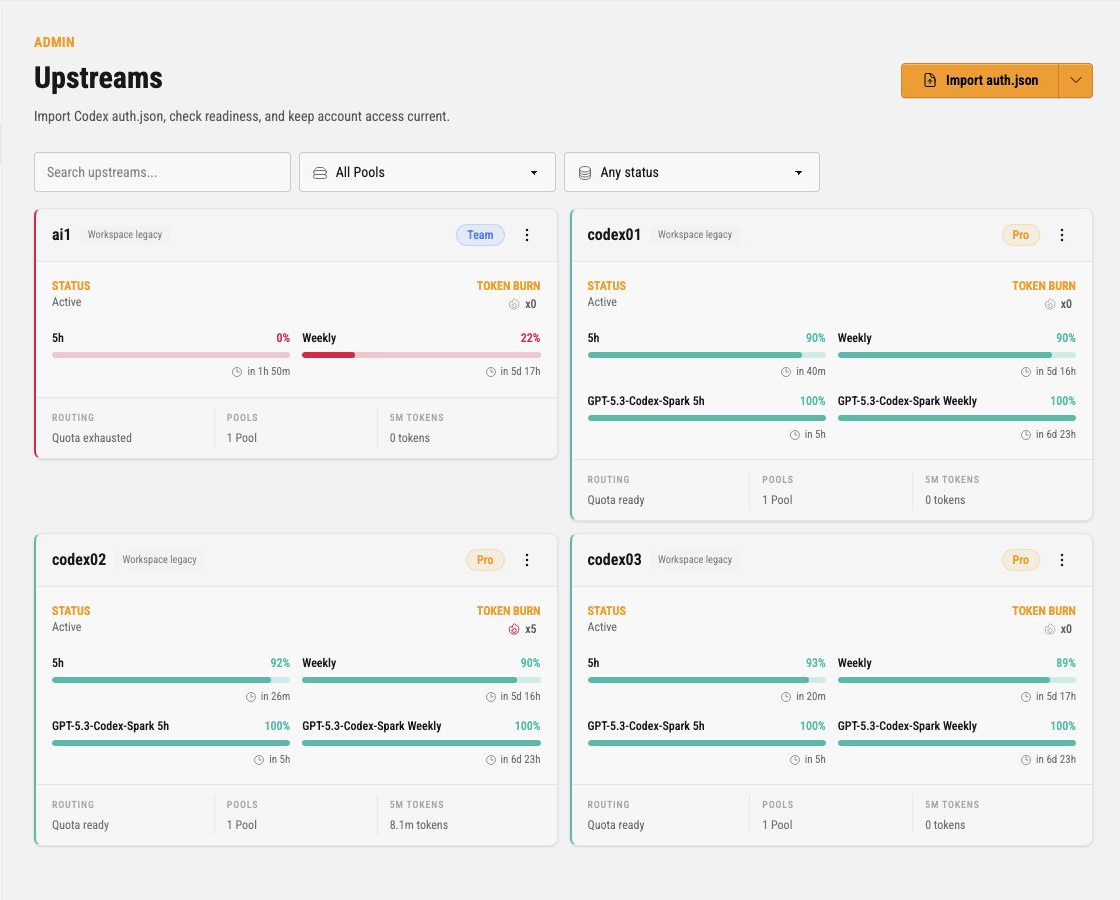
What an Upstream Controls
Section titled “What an Upstream Controls”An upstream account is not a client credential. Clients authenticate with Pool API keys. Codex Pooler then chooses an eligible upstream assigned to that Pool.
An upstream controls:
- encrypted account credentials linked through OpenAI OAuth or imported from Codex
auth.json - account lifecycle state, such as active, paused, refresh due, or reauth required
- Pool assignments that make the account available to routing boundaries
- quota and token freshness evidence used by route eligibility
- model and route compatibility evidence observed from the account
- operator-facing labels used in cards, logs, audit events, and recovery views
Routing still happens at request time. A visible active upstream can be skipped if it is not assigned to the Pool, does not support the requested model or route shape, has stale credentials, is temporarily demoted, or lacks usable quota evidence.
Page Actions
Section titled “Page Actions”The page header exposes the account onboarding actions as separate buttons:
OAuth, for linking a new upstream account through OpenAI authorization without handlingauth.jsonInvite, for onboarding a person who will provide or operate an account through the browser UIImport, for adding an account from Codex CLI or Codex Desktopauth.jsoncredentials
Prefer OAuth for new operator-managed upstream accounts when browser authorization is practical. It stores resulting credential material through encrypted upstream secret storage and keeps the admin surface metadata-only.
Invite onboarding and the OAuth device-code fallback use OpenAI’s Codex device-code authorization. This setup is only for those device-code paths; browser OAuth linking does not depend on it. Before using an invite or fallback flow, a personal ChatGPT account should have Enable device code authorization for Codex enabled in ChatGPT Settings > Security. Workspace-managed accounts may need a workspace admin to enable device-code login for Codex in workspace permissions. If OpenAI blocks device-code approval, the invite or fallback flow may remain pending but the upstream will not become ready.
The search box filters upstream cards by account label or safe metadata. The Pool filter narrows cards to accounts assigned to a specific Pool. The status filter narrows cards by lifecycle or readiness state.
Account Cards
Section titled “Account Cards”Each account appears as a card. The header shows the operator label, workspace badge, plan badge, and dotted action menu. Clicking the account label opens the upstream cockpit.
The card body is split into status, token burn, quota windows, and footer metrics.
| Card area | Meaning |
|---|---|
| Status | Current lifecycle and route-readiness state for the account. Active means the account can be considered, but final routing still checks Pool assignment, model support, credential freshness, and quota evidence. |
| Token burn | Recent token multiplier shown from observed usage pressure. It is a quick warning signal, not a billing ledger. |
| Quota bars | Observed window fullness for account-level and model-specific quota windows. Green windows have usable room; red or exhausted windows can keep the account out of routing. A solid account bar means included Codex quota remains. A striped account bar appears only after that quota is exhausted and requests are consuming the provider-reported credit balance. |
| Routing | Compact lifecycle-aware runtime routing readiness summary. It separates identity lifecycle, Pool assignment, credential freshness, and quota evidence so operators can see why this account is likely eligible or blocked before request-specific checks. |
| Saved resets | Compact reported saved reset count badge plus bounded post-consume confirmation while a recovery attempt is settling or ends unsuccessfully. The badge appears only when at least one saved reset is available; pending, not-applied, or expired confirmation can remain visible after the count reaches zero. Policy editing opens from the account-card Saved resets dropdown action. |
| Pools | How many Pools currently assign this upstream account. |
| 5m tokens | Recent token volume observed for this upstream over the short rolling window. |
The account quota percentage always follows the provider’s reported usage window while included Codex quota remains. A provider-reported credit balance may still appear as a raw balance beside the solid bar, but a positive balance does not make the bar striped before included quota is exhausted and the balance is never presented as a fabricated balance / capacity total. When the provider reports the included window at 100% and a positive balance remains, the bar becomes striped and continues to show only the current raw credit balance. An explicit depleted balance is shown as 0 credits without stripes. If the provider omits the balance, the card says credits not reported instead of leaving the detail blank. Provider credit units are not a currency amount, so they should not be compared directly with the monetary balance shown in ChatGPT billing.
Fresh reset-bearing windows remain the normal authority for quota readiness. If the provider returns no account windows, a card can instead show provider-attested availability when a fresh observation for the current credential generation explicitly allows requests or reports usable credits, and no retained account window, applicable model limit, or additional-limit blocker applies. This is a distinct lower-priority state: the card does not invent a quota bar, percentage, duration, reset time, or remaining-capacity value.
Provider-attested availability remains conservative. Explicit blocked, contradictory, unknown, stale, credential-mismatched, malformed, model-exhausted, or additional-limit-blocked evidence keeps routing fail closed. Plan badges and plan metadata are descriptive only; no operator setting, plan name, or SKU enables this fallback.
This state comes from Codex Pooler’s direct provider usage response. Current Codex client quota projections omit the raw availability flags, so a client-side quota snapshot cannot independently confirm the same no-window observation.
Saved Resets
Section titled “Saved Resets”Account cards show a compact saved-reset count badge only when sanitized usage observations report at least one available reset. Common cockpit labels are N saved resets, No saved resets, Saved resets unavailable, and Saved resets not reported. When sanitized saved-reset observations include expiration metadata, the badge title, cockpit summary, and saved-reset dialog also show the next expiration time. The count badge and the card dropdown action Saved resets open the saved-reset dialog.
After a saved reset is consumed, the account card and cockpit can keep a bounded confirmation panel visible even when no saved reset remains in the bank. It shows Awaiting confirmation, Not applied, or Confirmation expired. A reset that was accepted but has not yet produced usable quota remains Awaiting confirmation; it is not presented as not applied or expired. Once usable quota confirms a healthy completion, the panel disappears. The five bank segments always represent the current saved-reset count and are never recolored by confirmation history.
The confirmation panel shows only fixed operator vocabulary for challenged evidence (Absent, Exhausted, Candidate progressing, or Usable) and any additional account blocker (None, Reset missing, Expired, Not fresh, Exhausted, or Unknown or unusable). It also shows the sanitized consume time, confirmation deadline, whether confirmation routing is paused, and the guarantee that the same confirmation never consumes a second saved reset. Long detail remains available to assistive technology and pointer users through the panel’s accessible label and tooltip.
Malformed or unknown confirmation data fails closed as Confirmation details unavailable with routing paused. The surface never renders raw candidate metadata, quota percentages, quota reset timestamps, provider ids, internal ids, or unknown provider strings. Usage unavailable remains a separate token-accounting state and does not describe saved-reset confirmation.
The saved-reset dialog explains the reported reset count in plain operator terms and edits auto-redemption policy. If expiration metadata is available, it shows the next available saved reset expiration and the number of reported expiration dates. Expiration rows are informational and are not specific targeted credits. The dialog and cockpit both require an explicit confirmation before queueing one account-level manual recovery attempt. Saving the policy never enqueues redemption work.
Manual redemption is enabled only when the upstream is not deleted or disabled, credentials are usable, at least one Pool assignment exists, a saved-reset count has been reported, the reported count is greater than zero, and no redemption claim is already in progress. A phase-bearing consuming claim remains protected while the system establishes its outcome. Otherwise the action is disabled with the matching blocker, such as missing credentials, no Pool assignment, unreported count, no available resets, or an in-progress redemption.
Auto redemption is a per-upstream opt-in policy available from the account-card Saved resets dialog and the upstream cockpit. New accounts default to auto redemption off. Operators choose whether request-driven automatic redemption waits until weekly or monthly account quota is blocked or may start earlier when fresh weekly or monthly account quota evidence shows every eligible candidate account is near the configured Near-limit threshold. Those are the only immediate request recovery paths: request traffic does not own expiration rescue. The Natural reset buffer prevents request-driven exhaustion and threshold recovery from spending a reset when weekly or monthly account quota will reset naturally soon. For traffic-independent scheduled rescue, the ordinary exhausted path and the per-account threshold path also require the configured buffer. A scheduled exhausted path may instead proceed when fresh expiration evidence shows the saved reset expires before the natural long-window reset. Resets to keep reserves saved resets from automatic use.
Automatic recovery coordinates only the compatible accounts considered together for that request; separate partially overlapping groups are not treated as one global lock. After any applied redemption, automatic work observes a fixed thirty-minute protection period and waits for definitive evidence before another automatic consume. The system may also preserve a successful near-limit route when another compatible account has fresh usable capacity. Stale, incomplete, incompatible, disabled, or non-routeable evidence never creates that veto. Hard quota exhaustion keeps its original behavior, and only continuations whose pin is durably verifiable — a resolved prior-response anchor or file affinity — bypass the veto; a websocket-bound continuation or a newly started session on its first turn keeps its route but does not bypass it. Manual and scheduled work can record recovery state, while routine automated recovery remains centrally visible in Jobs.
Two circuit fences keep automatic recovery conservative without changing circuit policy. The existing circuit-eligible capacity fence applies only to threshold-pressure recovery: a compatible sibling that is still circuit-eligible and has fresh usable quota preserves the successful route and prevents a reset. The transient-circuit fence is separate. It applies to both gateway-auto triggers — blocked long-window exhaustion and threshold pressure — when a compatible sibling was excluded only by circuit state and still has usable quota. Both triggers wait for one attempt-owned failed half-open recovery before a saved reset can proceed; an open circuit with a future recovery boundary, a pending half-open probe, or a circuit that has closed during revalidation keeps the reset unspent.
At the irreversible gateway-auto decision, the system locks the compatible upstream-identity cohort, then the target Pool assignment, then every referenced circuit row in one ordered batch. A recoverable transient circuit returns the exact noop gateway_auto_sibling_transient_exclusion with applied=false; it creates no redemption claim and makes no provider reset call, while the original route or quota result remains in place. Threshold-pressure keeps its historical exception for a durably verifiable hard-pinned continuation. A hard-pinned exhaustion path never spends a saved reset: it returns pinned_continuation_unavailable with zero automatic consumes. open_no_probe is deliberately not a transient-circuit veto because it has no deterministic recovery boundary.
Verification does not require a live reset. Confirm the bounded gateway-auto result code and applied=false through the normal sanitized logs or test coverage, and use circuit readiness separately to understand whether a lane is currently blocked or recovering; the recovery marker does not add a new admin state, readiness widget, or monitoring dashboard series.
The 24-hour horizon is a scheduled observation and consideration window, not an immediate-consumption deadline. A known saved reset inside that window can be considered without generative or other runtime traffic only after canonical scheduled reconciliation has persisted current quota and saved-reset evidence for the upstream identity. Scheduled rescue then requires one of three conditions: B1 long-window exhaustion, B2 the configured threshold reached for that identity, or B3 the final inclusive 90-minute last call. B1’s ordinary exhausted path and B2 require the configured Natural reset buffer. B1 may bypass that buffer only when a fresh expiration observation shows the saved reset expires before the natural long-window reset (E < R). B3 requires positive long-window usage, fresh expiration evidence, and E < R. Inside the 24-hour consideration window, successful expiration observations are refreshed on a shorter schedule, and failed refreshes use progressively shorter retry spacing as expiration approaches. Oban deduplicates scheduled work as one incomplete job per upstream identity, then revalidates the active assignment, policy, count, quota, expiration evidence, and winning condition before it can consume a credit.
A background expiry consume creates neither a request probe nor an accounting request. If immediate confirmation is incomplete, routine scheduled recovery keeps the established attempt and, when an upstream requires a selected saved reset, keeps that same selection. Recovery is write-bounded, then becomes read-only after those limits are exhausted. It remains fail-closed until definitive fresh evidence confirms recovery or reblocks the account; time alone does not release it. Recovery status is centrally visible in Jobs. The guarded one-shot request probe belongs only to redemption initiated by a runtime request.
Saved reset observations and redemption attempts stay metadata-only on upstream_identities.metadata under saved_resets and saved_reset_redemption. The saved-reset observation may include sanitized expiration rows in available_expirations, where each row has expires_at, a pooler-owned durable first_seen_at, and granted_at only when the upstream supplied a valid timestamp. Legacy available_expires_at stays available for compatibility, and next_expires_at, expires_observed_at, and expires_refresh_attempted_at remain sanitized aggregate fields. A returning expiration rematerializes its original first_seen_at; missing or invalid provider timestamps stay unavailable and are never guessed from the expiration.
After a provider accepts a reset, one triggering request can hold a pooler-generated, one-shot lease while the account awaits confirmation. The lease is internal non-secret correlation material, not a client credential or provider secret. Its persisted scope is exact: Pool assignment, upstream identity, effective model, and route class. The token and full scope never appear in cards, cockpit views, logs, audit records, request metadata, or public APIs.
The lease is irreversible. Only a matching success before the confirmation deadline can confirm the recovery window. A failure, cancellation, timeout, scope mismatch, or success at or after the deadline never unlocks or replaces the lease, spends another reset, selects another account, or broadens routing. Fresh matching quota evidence still provides the final recovery or reblock decision.
Operators can configure the optional upstream_saved_reset_banked_first_seen alert rule to notify each time a new saved reset appears for a matching Pool assignment. The evaluator uses a stable v2 upstream-identity key that includes neither reset_expires_at nor any expiration instant: saved resets first seen in the same evaluation aggregate into one candidate and one upstream-global incident, with impacted Pool targets aggregated on that incident. A later grant, one first seen after everything an earlier incident reported, opens a new incident and alerts again; the same saved reset never alerts twice. Candidate eligibility uses first_seen_at; granted_at is display metadata only. The alert uses the same metadata-only observation boundary as the saved-reset UI and does not call provider APIs during evaluation.
Policy fields live on the upstream identity as saved_reset_auto_redeem_enabled, saved_reset_auto_redeem_trigger_mode, saved_reset_auto_redeem_quota_threshold_percent, saved_reset_auto_redeem_min_blocked_minutes, and saved_reset_auto_redeem_keep_credits. Do not copy provider payloads, raw provider credit objects, raw credit identifiers, titles, descriptions, request ids, redemption request identifiers, client or provider token material, secrets, or account credentials into metadata, logs, docs, or tests. The internal one-shot lease token is not a credential, but it remains non-renderable correlation material and must not be exposed.
Readiness States
Section titled “Readiness States”Common upstream states are:
| State | Meaning |
|---|---|
| Active | The account is configured and can be considered for eligible Pool traffic. |
| Paused | The account stays configured, but Codex Pooler should not select it for new traffic. |
| Refresh due | The account needs credential or quota refresh work before freshness is trusted. |
| Refreshing | A background refresh is currently updating account evidence or credentials. |
| Refresh failed | refresh_failed means credential or auth lifecycle refresh failed. Treat it as identity recovery work first; quota readiness may still be unknown or stale until credentials are relinked or refreshed successfully. |
| Reauth required | The account needs operator recovery before it can route work again. Relink with OpenAI OAuth, import replacement credentials, or reinvite the account when those actions are available. |
| Quota exhausted | Observed quota evidence says the account should not receive matching work until one or more windows reset. |
| Provider available | No account window is reported, but a fresh current-credential provider observation explicitly reports availability and no stronger account, model, or additional-limit evidence blocks routing. No reset or quota window is inferred. |
Readiness is intentionally conservative. Missing, stale, unknown, malformed, credential-mismatched, or exhausted quota evidence can keep an account out of routing even when the card still exists and the account is assigned to a Pool. A no-window account is routeable only through the narrow provider-attested state described above.
When every observation of a quota window has gone stale, for example because usage reads keep failing, the card shows the last value reported for the cycle that is still running. An observation whose reset time has already passed describes a cycle that has ended, so it never sets the displayed value while another observation of the same window reports a reset in the future. An observation whose reset time passed more than 30 days ago is ignored by the card, readiness, alerts and routing, and the scheduled runtime cleanup deletes it, so a window the provider no longer reports eventually leaves the card instead of showing its last value indefinitely. Whether the cleanup has already run makes no difference to what Codex Pooler shows or routes. Saved-reset automatic-confirmation state keeps an observation only while that state still refers to a reset less than 30 days old.
Provider-Requested Polling Pauses
Section titled “Provider-Requested Polling Pauses”Codex Pooler reads an account’s usage endpoints on a short cycle to keep quota evidence fresh. If the provider answers one of those reads with 429 Too Many Requests or 503 Service Unavailable and a Retry-After header it can act on, Codex Pooler stops reading that account’s usage endpoints until the time the provider named.
The pause applies to one provider account at one provider host. It covers the alternative usage endpoints, the optional reset-credit detail read, the scheduled reconciliation cycle, a manual refresh, and the confirmation read after a saved reset is applied. Every Codex Pooler replica honours the same pause. It ends on its own when the deadline passes. The provider throttles the account, not one access token, so the pause survives everything that keeps the credentials on the same provider account: a token refresh, including Refresh token, Pause followed by Reactivate, and a re-import or relink of the same account. It ends early only when the upstream account’s stored account id changes to a different provider account; an account imported without an account id keeps the pause only until its credentials are next replaced. Codex Pooler never shortens the interval the provider named, has no upper limit for it, and offers no action to end it early: if the provider is throttling the account, reading again before it asked would bring nothing.
While a pause is running, the account card and the upstream cockpit show Usage polling paused until with the deadline, the time left, and what caused it, for example HTTP 429 with Retry-After. When more than one usage host of the account is paused, the card shows the latest deadline and how many hosts are paused. The provider host itself is never shown.
A Retry-After that pauses usage polling for more than one hour is also written to the application log as a warning (usage polling paused beyond the long-pause threshold), with the account id, the status and the deadline, so an unusual interval is noticed even when nobody is looking at the card.
What a pause does not do:
- It is not a quota fact. The account is not marked exhausted, and no reset or window is inferred from it.
- It does not block generation requests. Pool routing keeps using quota evidence that is still fresh, and keeps failing closed when evidence is missing or stale, exactly as it does otherwise.
- It does not spend or re-apply a saved reset. A reset already applied stays pending until valid evidence arrives.
- It does not affect other accounts, or the same account at a different usage host.
If the provider sends no Retry-After, or sends one Codex Pooler cannot read, nothing changes: a 429 still tries the alternative endpoint and a 503 still stops that read, both without a pause. A read already in flight when a pause is recorded is allowed to finish.
An account whose usage reads are paused can look like an account whose evidence is simply going stale. Quota evidence stays usable for routing only for a short freshness window after it was observed, so an account that is not serving traffic leaves routing well before a long pause ends, and reconciliation reports that quota refresh is unavailable. Check the account card first: with the pause notice, the cause is the provider’s instruction and usage reads resume at the deadline shown. Without it, treat the stale evidence as an ordinary refresh problem.
Import auth.json
Section titled “Import auth.json”Click Import to open the upstream credentials dialog when an existing Codex auth.json is the right source of account credentials.
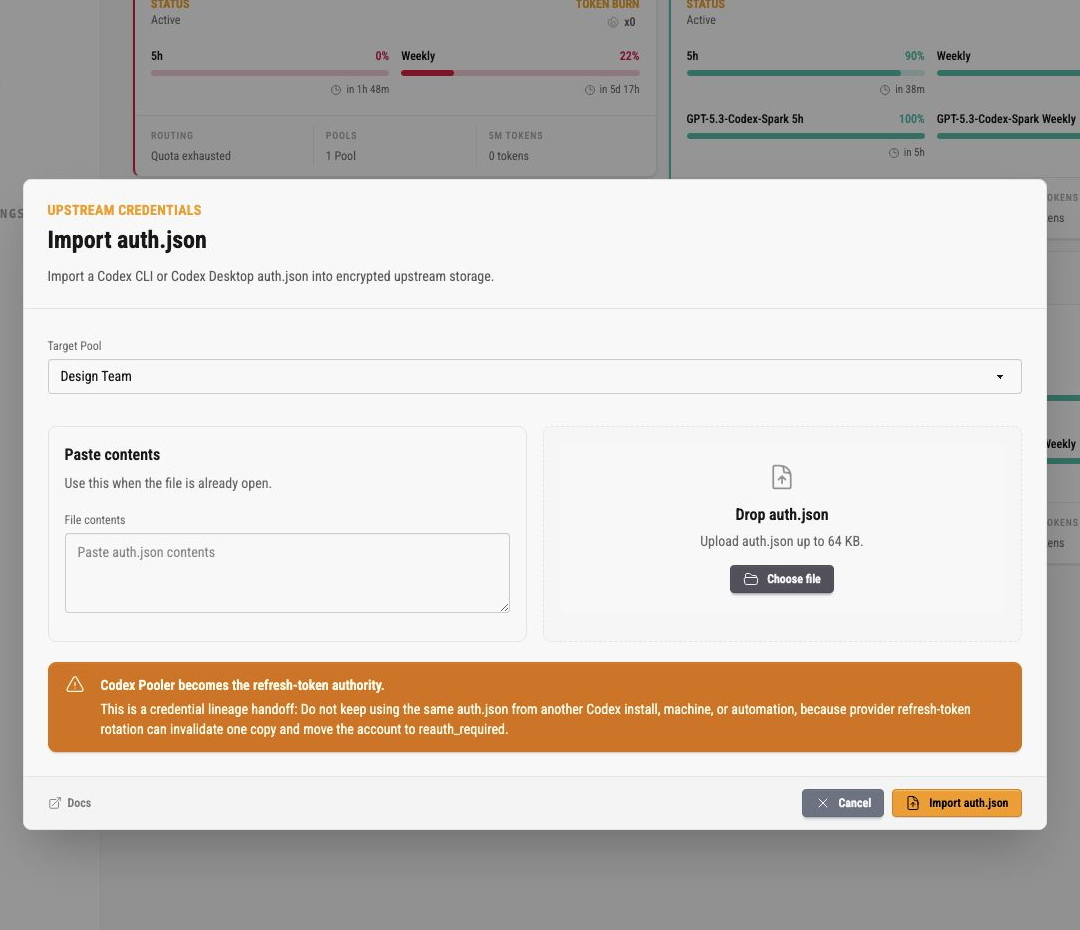
The import dialog asks for:
- target Pool, which assigns the imported account to a routing boundary
- pasted
auth.jsoncontents, when the file is already open - uploaded
auth.json, when the file is available on disk
The upload accepts small auth files only. The current UI states a 64 KB limit.
After import, Codex Pooler becomes the refresh-token authority for that account lineage. Do not keep using the same auth.json from another Codex install, machine, or automation. Provider refresh-token rotation can invalidate one copy and move the account into reauth_required.
Export auth.json from the intended signed-in account, then import each user lineage separately. When the auth file returns an OpenAI user subject, Codex Pooler uses it with the account and workspace identifiers to separate multiple credentials from the same account and workspace. The admin UI may show a sanitized subject reference so operators can distinguish those rows, but it never renders the raw subject.
The dialog footer keeps docs on the left and the submit actions on the right. Cancel closes without importing. Import auth.json stores the credential material through encrypted upstream secret storage.
OpenAI OAuth Upstream Linking
Section titled “OpenAI OAuth Upstream Linking”OpenAI OAuth upstream linking is an authenticated admin workflow. Use
OAuth on /admin/upstreams to link a new OpenAI upstream account to a selected Pool. Use
/admin/upstreams/:id to relink or reconnect the exact upstream identity shown
in the cockpit. Relink checks the returned account and workspace claims against
the target identity before replacing encrypted credential material. When OpenAI
returns a user subject, Codex Pooler also uses that subject to keep same-account,
same-workspace upstream credentials distinct.
If OpenAI omits workspace evidence during relink, Codex Pooler keeps the selected
cockpit slot only when stored account, email, or sanitized subject proof matches,
incoming plan and seat evidence are both present, and that evidence is compatible
with known cockpit metadata. Older slots with missing plan or seat metadata can
fill those empty fields from the accepted callback. Missing or incompatible
evidence still returns identity_mismatch; use the intended provider session or browser
profile before retrying.
Browser account choice is controlled by the active OpenAI or Google browser session. Codex Pooler can start the authorization flow, but it cannot force the provider account chooser by itself. Sign in to the intended provider account, or use a separate browser profile, before completing the link or relink.
The browser manual callback workflow is:
- open the OAuth link or relink dialog
- choose
Browser - open the generated OpenAI authorization URL
- complete OpenAI authorization in the browser
- paste the resulting returned browser URL back into the admin dialog
- submit the callback form and wait for the success or safe error state
- use
Closeafter the dialog reports that the account was linked or relinked
The returned browser URL is consumed only by the already-authenticated admin page.
There is no hosted OAuth callback route or public callback endpoint for this
workflow, and there is no /api/admin/* or dashboard JSON API for it. The
callback is handled inside the signed-in admin page.
Use the device-code fallback when browser authorization is not practical. The dialog shows the user code and verification URL while the flow is pending, and the page polls only while the operator keeps the dialog open. Device-code authorization must be enabled for Codex on the OpenAI account or workspace. It may be unavailable or denied by account or workspace policy. If device authorization is unavailable or denied, use the browser workflow or ask the workspace admin to enable Codex device-code login.
Immediately after a successful link, the new account is not guaranteed to route
traffic. Codex Pooler creates the initial Pool assignment and enqueues account
reconciliation to prime quota evidence. That quota refresh can require a token
refresh first. If token refresh fails, the account can move to refresh_failed
before any user request is routed, and runtime routing excludes it until token
refresh succeeds or the credentials are relinked.
Scheduled proactive refresh is based on token expiry and includes busy accounts. It is enabled by default; use System → Gateway → Proactive credential refresh to disable this selection. Already queued proactive jobs recheck that setting before contacting the provider. Manual refresh, lifecycle recovery, and refresh after an upstream authentication failure remain available.
When proactive refresh starts from an active account and fails transiently, the same canonically known, unexpired credential remains active and pinned continuations may keep using it. The failed refresh remains retryable: delays are 60, 120, 240, 480, 960, 1920, and 3600 seconds before the eighth attempt. After exhaustion, scheduled selection observes the six-hour cooldown. Unknown or expired credentials and reactive authentication failures do not receive this preservation; terminal refresh-token rejection still requires reauthentication.
Operators should never paste callback URLs, authorization codes, tokens, cookies, returned browser URLs, raw auth.json, OpenAI provider payloads, raw user subjects, or local credential files into docs, tickets, logs, or evidence. The admin UI may show the one-time authorization URL or device user code during a pending flow, but persisted flow summaries, audit metadata, request logs, tests, and docs stay metadata-only.
Safe OAuth troubleshooting codes:
| Code | Operator action |
|---|---|
invalid_callback_url | Paste the full localhost callback URL from the browser address bar. |
invalid_callback_origin | Use only the local browser URL produced by the OpenAI flow. |
missing_state | Restart the OAuth flow from the admin dialog. |
duplicate_callback_param | Restart the OAuth flow and paste the unedited callback URL. |
missing_callback_result | Restart the OAuth flow because the callback did not include a usable result. |
provider_denied | The OpenAI authorization was denied; restart only if the account should be connected. |
invalid_state | Restart from the current admin dialog; an old or unrelated callback was pasted. |
expired_flow | Start a new OAuth flow. |
flow_not_pending | Close the stale dialog state, start a fresh OAuth link or relink flow, and use the latest callback URL. |
stale_flow | A newer flow superseded this one; use the latest dialog state. |
token_exchange_failed | Retry once, then inspect OpenAI availability and sanitized provider status. |
identity_mismatch | Relink with the same OpenAI account, workspace, and sanitized subject reference shown in the cockpit. Missing provider workspace evidence is accepted only for the selected cockpit slot when stored account, email, or sanitized subject proof matches and incoming plan and seat evidence are present and compatible with known cockpit metadata; otherwise retry from the intended provider session. If a different person in the same workspace should be added, link or import that user lineage as a separate upstream identity. |
identity_conflict | Resolve the duplicate or ambiguous upstream identity before retrying. |
unauthorized_pool | Confirm the operator can manage the selected Pool. |
Card Action Menu
Section titled “Card Action Menu”Open the dotted menu on an upstream card for account actions.
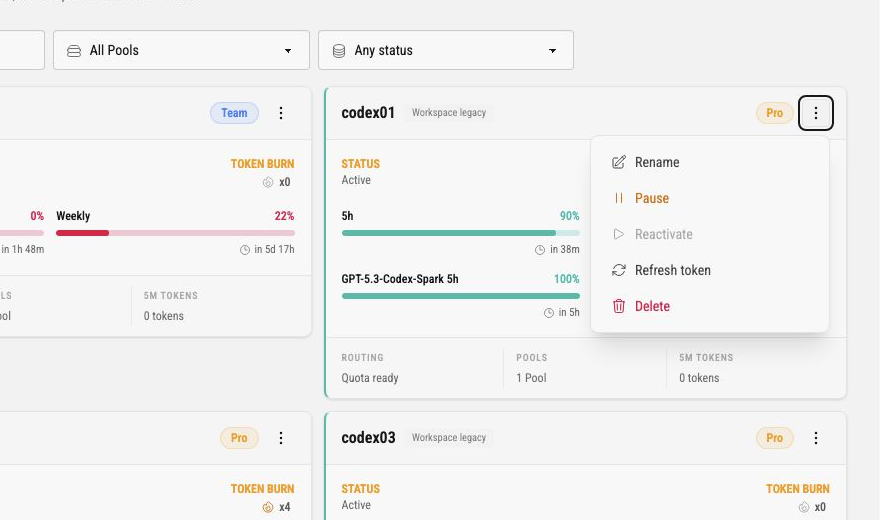
The current actions are:
| Action | What it does |
|---|---|
| Rename | Opens a label dialog. This changes the operator-facing account label only. |
| Pause | Stops the account from being selected for new runtime work while keeping it configured. A successful action queues an immediate catalog refresh for affected active Pools, so availability follows after the refresh runs. |
| Reactivate | Returns a paused or recoverable account to active consideration when the action is enabled. A successful action queues an immediate catalog refresh for affected active Pools, so availability follows after the refresh runs. |
| Refresh token | Requests a token-refresh job for the account. Use this when freshness evidence is stale or recovery instructions ask for it. |
| Replace auth.json | Appears for recovery states that can accept replacement account credentials. |
| Reinvite account | Appears for recovery states where operator-driven reauthorization is the right next step. |
| Delete | Soft-deletes the upstream from active use. This is an immediate destructive account-lifecycle action in the current UI, so use it only when the account should leave routing. |
Some actions are disabled or hidden depending on the account state. For example, Reactivate is not useful while an account is already active, and recovery actions only appear when the account is in a recovery-eligible state.
Rename Dialog
Section titled “Rename Dialog”Rename opens a small account dialog.
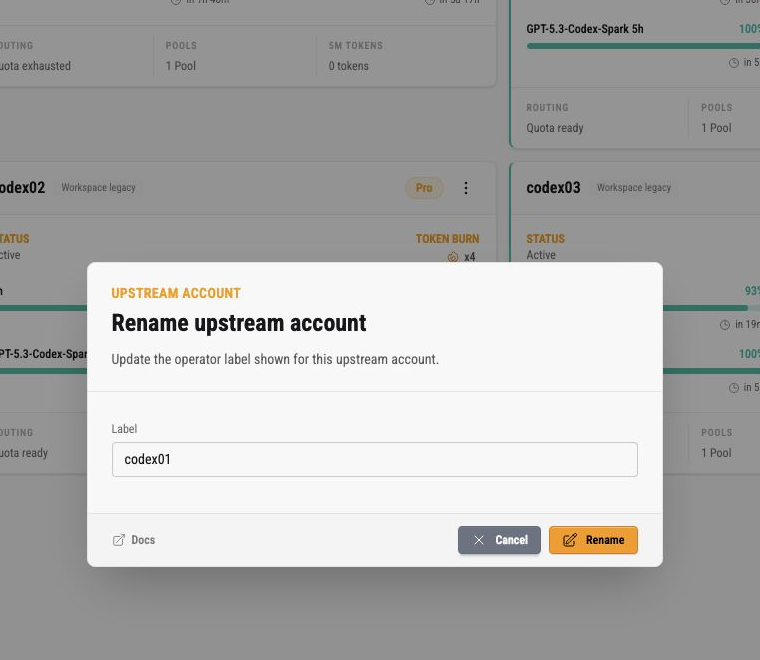
The label is the operator-facing name used in cards and related metadata. It is not the provider account ID, not a Pool API key, and not secret material. Use labels that make operations clear without embedding private customer or credential details.
Upstream Cockpit
Section titled “Upstream Cockpit”Clicking an account label opens the upstream cockpit.
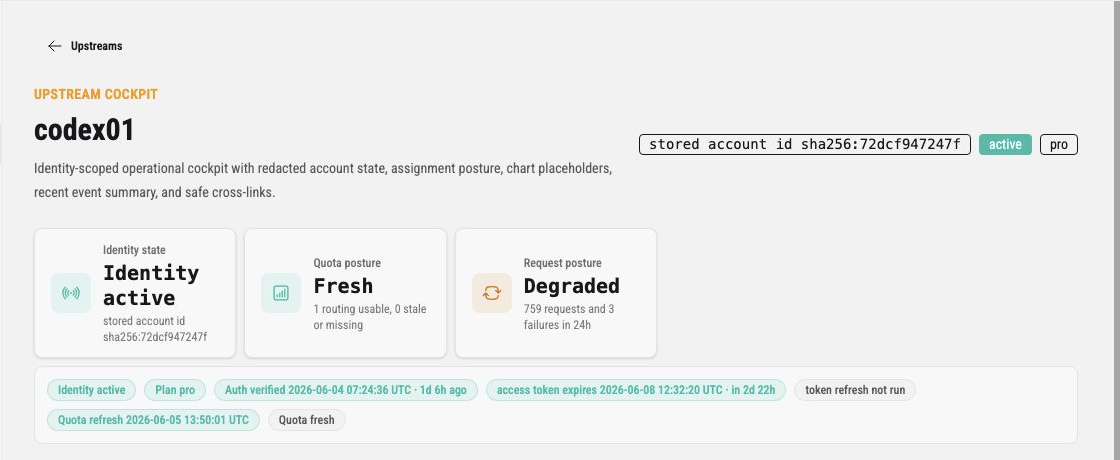
The cockpit is the focused detail view for one account. The top summary shows identity state, quota posture, request posture, saved reset status, stored account identifier hash, lifecycle badges, token freshness, and quota freshness. It also exposes OAuth relink for reconnecting the selected upstream identity through OpenAI OAuth, Redeem saved reset when manual redemption is available, and the saved-reset auto-redemption policy controls.
Saved-reset manual redemption is available from the cockpit and from the account-card saved-reset dialog. The summary metric shows the reported count, the actions area shows Redeem saved reset when manual redemption is available, and the saved-reset policy form controls auto redemption, trigger mode, near-limit threshold, natural reset buffer, and resets to keep.
For each current reset expiration, the bank shows banked only when the upstream reported a valid grant time. When that time is unavailable, it shows seen for Codex Pooler’s first discovery of the expiration and uses that discovery only as the display fallback. It never estimates a grant date from the expiration date.
Use it when the card says an account is degraded, stale, exhausted, or needs recovery. The detail page provides more space for assignment posture, quota health, recent events, and related links without exposing raw account secrets.
Operational Checklist
Section titled “Operational Checklist”When an upstream is not routing as expected, check it in this order:
- confirm the upstream state is
active - confirm it is assigned to the Pool used by the client API key
- confirm the Pool itself is active
- inspect the routing footer for lifecycle-aware runtime routing readiness across identity state, Pool assignment, credential freshness, quota signals, and request posture
- inspect quota bars for exhausted account-level or model-specific windows; if no account bars exist, check whether the routing label says
Provider availableor reports missing/blocked evidence - confirm token freshness and quota freshness are recent enough to trust; a no-window observation must belong to the current credential generation
- open the upstream cockpit when the card shows degraded, stale, or recovery states
- use Request logs filtered by Pool or upstream metadata to confirm whether traffic selected this account
- use Audit logs when lifecycle, assignment, import, pause, or rename actions changed recently
If an account remains inactive after linking, import, or refresh, treat reauth_required as a credential-lineage problem first. Prefer OAuth relink when browser authorization is practical. Importing the same stale auth.json again may not recover it if another machine already rotated the refresh token.