Trae
Trae and Trae CN are the same client family for this setup. Use one Codex Pooler custom model entry through the OpenAI Chat Completions API format. This is a chat-completions setup, not Codex backend compatibility and not full OpenAI API parity.
Runtime Shape
Section titled “Runtime Shape”Use a Pool API key for model requests. Do not reuse operator MCP tokens, browser sessions, upstream account tokens, or imported account material.
Custom Request URL:https://codex-pooler.example.com/v1
Full URL:off
Trae appends /chat/completions when Full URL is off. Do not end the custom
request URL with a slash.
For local setup, use http://localhost:4000/v1.
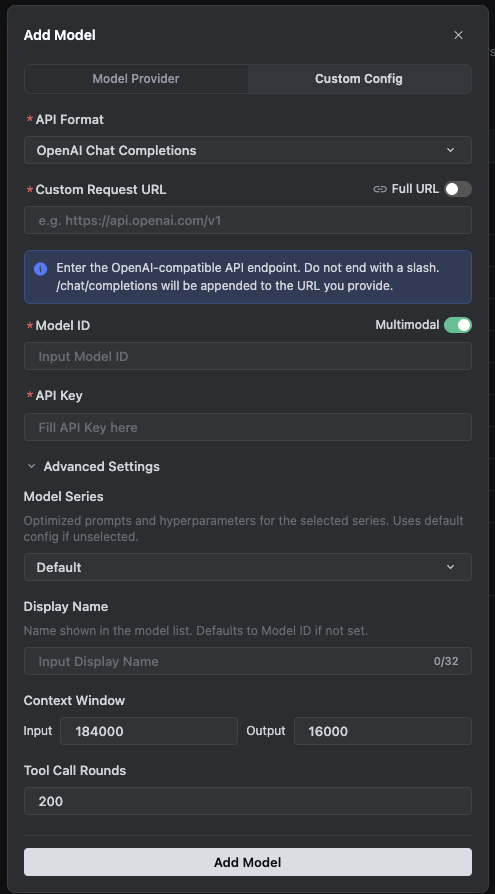
Custom Model Settings
Section titled “Custom Model Settings”Trae requires a Trae account session before the Models screen and agent chat surface are usable. Sign in to Trae first, then add the custom model.
In Trae, open Settings -> Models, add a custom model, and use the custom configuration path.
| Field | Value |
|---|---|
| API format | OpenAI Chat Completions |
| Custom Request URL | https://codex-pooler.example.com/v1 |
| Full URL | Off |
| Model ID | gpt-5.6-terra or another model id served by the assigned Pool |
| Multimodal | On when the Pool model supports image input |
| API key | Pool API key |
| Model Series | Default |
| Display Name | GPT-5.6 Terra via Codex Pooler |
| Context Window input | 184000 |
| Context Window output | 16000 |
| Tool Call Rounds | 200 |
If you enable Full URL instead, the value must become
https://codex-pooler.example.com/v1/chat/completions. Keep it off for the
normal setup shown above.
Trae CN Labels
Section titled “Trae CN Labels”In Trae CN, the same flow appears as 设置 -> 模型 and 自定义配置. The field values are the same:
| Field | Value |
|---|---|
| API 格式 | OpenAI Chat Completions |
| 自定义请求地址 | https://codex-pooler.example.com/v1 |
| 完整 URL | Off |
| 模型 ID | gpt-5.6-terra or another model id served by the assigned Pool |
| API 密钥 | Pool API key |
| 模型系列 | Default |
| 显示名称 | GPT-5.6 Terra via Codex Pooler |
| 上下文窗口 input | 184000 |
| 上下文窗口 output | 16000 |
| Tool Call Rounds | 200 |
With 完整 URL off, Trae appends /chat/completions to the request URL. If you
turn 完整 URL on, use the full
https://codex-pooler.example.com/v1/chat/completions endpoint instead.
For Trae Work, custom model availability is limited to the desktop/local environment in the current public docs. Keep this configuration on the client surface that can actually save and validate custom models.
Model Picker
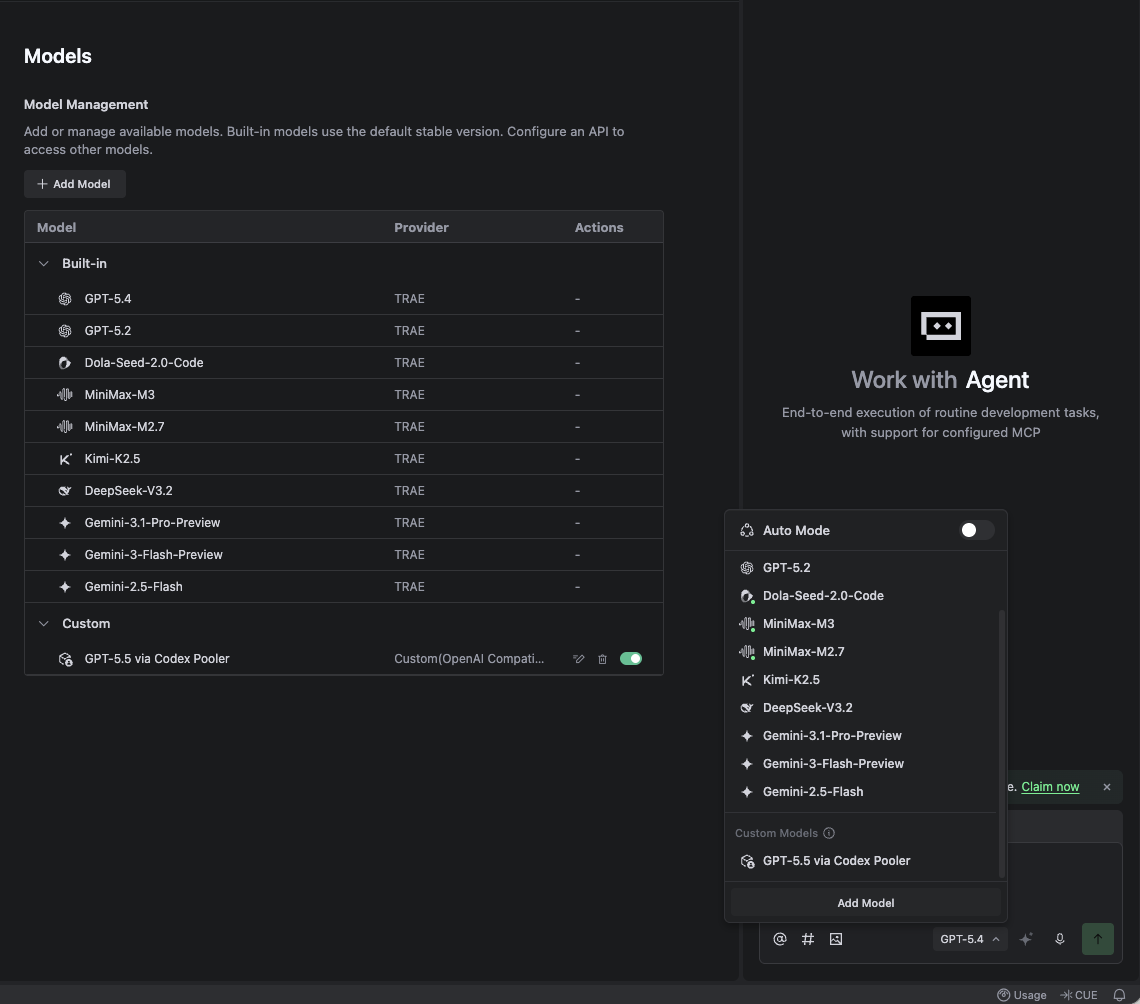
Section titled “Model Picker”After saving the custom model, open the agent model picker and turn Auto Mode off. The model list is hidden behind Auto Mode by default. Select the custom Codex Pooler model under Custom Models.
Connection Check
Section titled “Connection Check”First check the Pool API key and model with a direct chat-completions request:
curl -sS -X POST \ -H "Authorization: Bearer $CODEX_POOLER_API_KEY" \ -H "Content-Type: application/json" \ --data '{ "model": "gpt-5.6-terra", "messages": [ { "role": "user", "content": "Reply with exactly: trae ok" } ], "stream": false, "max_completion_tokens": 16 }' \ https://codex-pooler.example.com/v1/chat/completionsFor local setup, change the URL to
http://localhost:4000/v1/chat/completions.
Then save the custom model in Trae or Trae CN. Treat the setup as working only
when the model add/check step succeeds and a real chat can answer trae ok
through the configured model.
Boundaries
Section titled “Boundaries”Trae should point at Codex Pooler’s /v1 base URL with Full URL off, or at
/v1/chat/completions only when Full URL is on. Do not point Trae at
/backend-api/codex, /v1/responses, /mcp, or a Codex Pooler admin URL.
Codex Pooler model use does not require MCP. If you need operator metadata, use a separate MCP-capable host with an operator MCP token.