Monitoring and runtime triage
Codex Pooler exposes Prometheus metrics at /metrics. Metrics auth is managed from /admin/system; when bearer protection is configured, Prometheus must use the matching Kubernetes Secret reference rather than placing the credential in Helm values. /metrics is not protected by the runtime firewall.
Websocket control-path failures
Section titled “Websocket control-path failures”codex_pooler_gateway_websocket_control_failure_count counts observed callback failures by phase (init, serve, terminate) and bounded reason. These failures can happen before request reservation, so an empty request-error table does not rule them out. cleanup_deferred means supervised cleanup exceeded the socket’s 100 ms wait and continues separately; database and peer-call failures are reported as database_error and process_exit.
The runtime triage dashboard includes Websocket Control Path Failure Rate. Alert on a nonzero five-minute increase, sustained for one minute:
sum by (namespace, phase, reason) ( increase(codex_pooler_gateway_websocket_control_failure_count[5m])) > 0Correlate alerts with database checkout pressure and owner-cleanup logs. This counter records server-side failures; it does not measure TCP resets or prove that a close frame reached the client.
Metrics exposure states
Section titled “Metrics exposure states”The endpoint has exactly three states:
- Open: no metrics bearer is configured, so scrapes are allowed without it
- Bearer-protected: a metrics bearer is configured, so Prometheus must provide it
- Unavailable: metrics settings cannot be read, so
/metricsfails closed
Restore the previous metrics bearer state in /admin/system to roll back a
metrics exposure change.
Reachability
Section titled “Reachability”/metrics is served by the app role on the same listener as every other route, so any ingress that routes / to the app service also reaches it, and the runtime firewall allowlist does not apply to it. Since background events now reach the app reporter through the relay, that payload describes the whole cluster’s declared families rather than one pod’s own traffic.
For an internet-facing install, do one of the following before exposing the app service:
- configure a metrics bearer in
/admin/systemand give Prometheus the matching Kubernetes Secret reference, or - block
/metricsat the ingress and scrape the app pods in-cluster instead.
An in-cluster-only install with no external ingress can stay open. Metric payloads carry bounded label vocabularies and counters only, never request content, but they do describe traffic volume, model and transport mix, and failure rates.
Use monitoring for runtime evidence only. Dashboards, alerts, logs, tickets, and copied queries must not include prompts, response bodies, uploaded files, websocket frames, cookies, bearer tokens, upstream secrets, or raw Pool API keys.
Collector path
Section titled “Collector path”The Helm chart can render a Prometheus Operator ServiceMonitor for the app service:
monitoring: serviceMonitor: enabled: true labels: release: kube-prometheus-stack interval: 10s scrapeTimeout: 5sThe release label and scrape interval should match your own Prometheus Operator selectors and scrape budget. For fast OOM investigations, prefer a short interval for the app ServiceMonitor and keep broader Kubernetes collectors at their normal cadence. Worker and scheduler roles don’t start the Prometheus reporter because they don’t expose /metrics; use Kubernetes cgroup metrics and sampler logs for those pods.
Selected background events reach the app reporter through a Postgres relay: pre-attempt reservation releases, saved-reset convergence, quota cycle decisions, and gateway stream outcomes. Direct events carry via="in_process"; relayed events carry via="job_relay". The starter dashboard deliberately selects the direct share; keep it authoritative until a production comparison validates the relayed share. Relay claims are at-most-once and never reclaimed. Unclaimed rows expire after one hour. The Job Telemetry Relay row reports backlog, fresh consumers, and durable known loss totals for expiry, buffer overflow, and shutdown leftovers. These shared values use max across app observers, not sum. Hard kills, unavailable loss persistence, and loss between claim and scrape remain unquantified; durable accounting and quota rows remain authoritative. Graceful shutdown quiesces consumers before readiness withdrawal and attempts a bounded final producer flush, but a flat graph still does not prove the behaviour is absent.
Runtime triage dashboard
Section titled “Runtime triage dashboard”The reporter folds and renders Prometheus metrics once per second and serves the cached body to scrape requests. Values can therefore lag the latest event by one fold interval; repeated scrapes do not trigger another render.
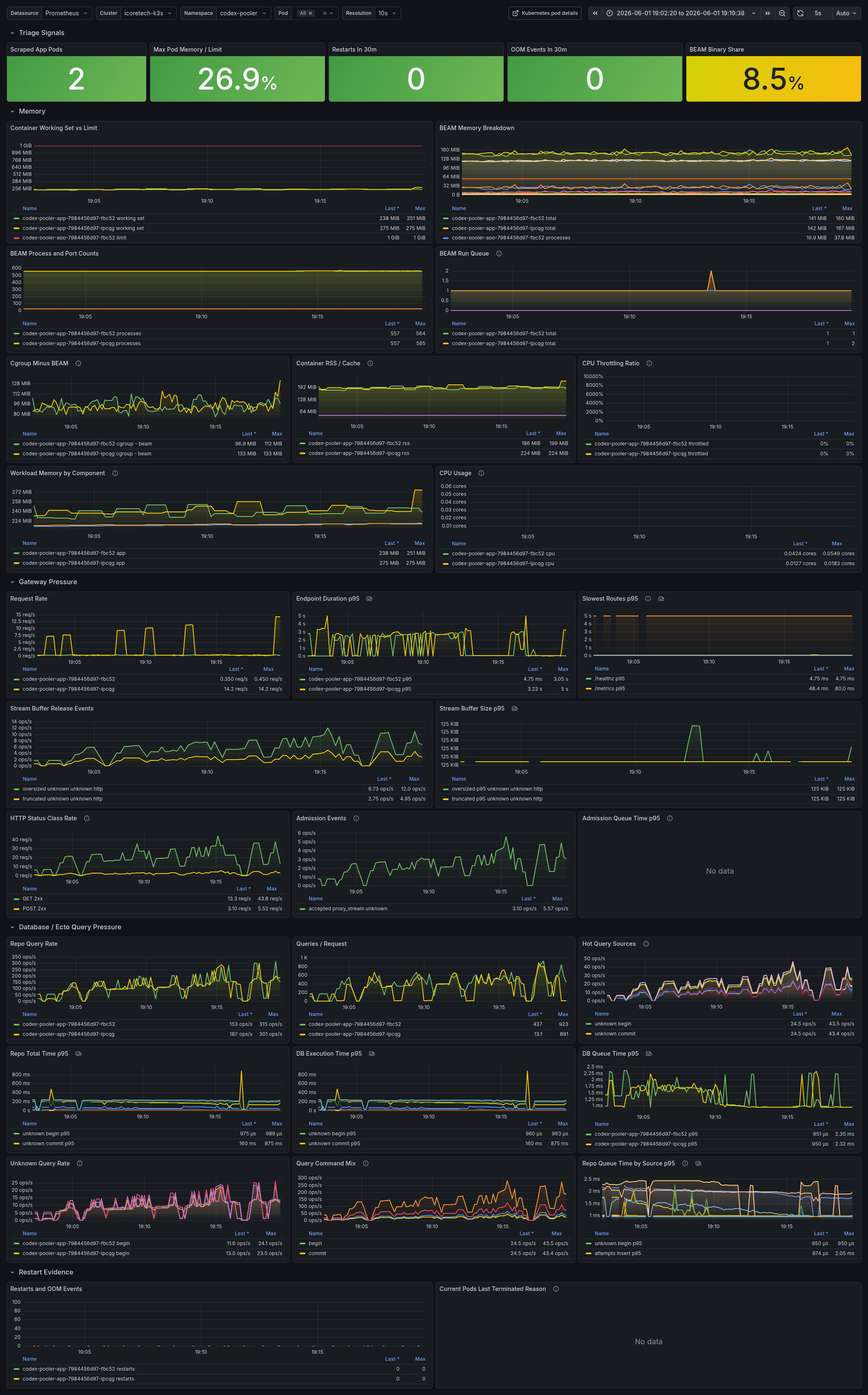
Build your Grafana or Prometheus dashboard around the signals needed to correlate runtime pressure across memory, request handling, gateway admission, database access, and restarts:
- Kubernetes cgroup working set versus pod memory limit, RSS/cache split, and cgroup memory not explained by BEAM total
- BEAM memory total, processes, binary, ETS, code, atom, atom used, and system memory by pod
- BEAM process count, port count, total run queue, CPU run queue, and IO run queue
- app restarts, OOM events, and current pod last terminated reason
- request rate, HTTP status class rate, and p95 endpoint/router latency
- gateway admission accepted, queued, rejected, timed-out, queue-time p95, and per-pod running or queued saturation by route class
- bounded stream outcomes, websocket bridge fallbacks, and stream-buffer oversized or truncated events
- Ecto query rate, queries per request, hot query sources by safe source and SQL command, unknown query rate, and DB queue p95
- routing circuit transition rate by transition, route class, and bounded reason class
- saved-reset post-consume convergence rate by bounded source and outcome, plus p95 timing from application to canonical evidence, canonical evidence to lifecycle finish, and application to lifecycle finish
- fenced affinity writes per pod by bounded operation and affinity kind
- reservations released with no attempt row, by bounded pre-attempt phase and transport
- client-visible
duplicate_turnrefusals, by bounded refusing stage and transport - native compaction admission clears, by bounded clear reason, admission stage, and topology
Read the dashboard as a correlation view. If cgroup memory climbs while BEAM total stays flat, look outside normal BEAM heap attribution. If vm_memory_binary_bytes climbs with cgroup memory, inspect streaming response retention, file bodies, and upstream transport buffering. If process count, ports, or run queue climb, inspect stuck request processes, websocket ownership, and overloaded route classes.
Admission saturation is local to each app pod. codex_pooler_gateway_admission_running and codex_pooler_gateway_admission_queued report the current state by route class on the reporting pod, not a cluster-wide queue. Every route class reports an explicit value, including zero. Normal exposition is 18 series per app pod, with a bounded ceiling of 20 including the invalid-label fallback. Select or aggregate pods deliberately when comparing capacity across replicas.
The gateway metrics are bounded at the source. Stream outcomes are succeeded, failed, settlement_failed, or interrupted; invalid values become unknown. interrupted means the turn lost the party carrying it: its client (client_disconnected) or its Pooler-side owner (owner_drained, owner_unavailable, owner_crashed). Every other terminal failure, including provider rejections and owner forwarding refusals, is failed, and the same vocabulary decides a turn’s interrupted terminal status. Their downstream and upstream transport labels are http_sse, websocket, or unknown, giving at most 45 series per via value per app pod across five effective outcomes and two three-value transport vocabularies. The two delivery paths plus the invalid-label fallback allow at most 135 stream-outcome series. settlement_failed is attempt-scoped, so concurrent failed terminal settlement attempts can each emit it. Websocket bridge fallbacks have at most 20 reason series per app pod, while precommit buffer overflow is a separate untagged counter.
The interrupted stream outcome is one of the partial counters listed after the ServiceMonitor example, and so is codex_pooler_quota_cycle_decision_count, which is not a gateway metric. Expired-owner recovery settles abandoned turns from the runtime cleanup job, so the interrupted outcome under-counts; the accounting request and attempt rows are complete. The quota cycle decision counter carries the request-path share of decisions under via="in_process"; account reconciliation, saved-reset redemption, and alert evaluation decide cycles as jobs, and that share arrives through the telemetry relay under via="job_relay" (best effort, at most once, one fold behind). The account quota window rows and their evidence history remain the complete record. On a deployment that runs separate OBAN_MODE=worker and scheduler roles, a low or empty series on either panel means not measured, not absent.
Oversized stream-buffer histogram observations saturate at 128 MiB for Prometheus export, so p95 remains finite. The runtime’s raw telemetry event and stream-buffer behavior are unchanged.
Fenced affinity writes
Section titled “Fenced affinity writes”codex_pooler_gateway_routing_affinity_stale_write_count counts the affinity writes the routing fence refused. Both affinity writers order themselves on the row’s updated_at event clock, so a writer whose event is older than the stored one applies nothing. That refusal is deliberate — routing bookkeeping must never fail a turn whose work is already finalized — and this counter is the only place it is visible. It is incremented only when the statement reports zero affected rows. The event clock is stamped by each writer from its own node clock, deliberately: affinity and demotion are soft ordering hints, the comparison must stay inside the single UPDATE statement so it orders against a writer on another node, and a database-clock stamp would not change what a stale writer may overwrite. The consequence is that the pod label names the writer that was refused, not the one that caused the refusal: one pod with a lagging clock shows the rate on itself, while one pod with a clock running ahead makes every other pod show the rate.
Two bounded labels: operation is success_upsert or miss_update, and affinity_kind is codex_session, idempotency_key, or request_correlation. Unrecognized values become unknown, giving at most 12 series per app pod. No Pool, API-key, assignment, identity, session, request, or affinity-key value is exported, and no node or instance name is in the payload: per-replica attribution comes from the scrape target’s pod label, which is what the dashboard panel groups by.
A low rate spread across pods is ordinary reordering between two nodes finishing overlapping turns on one affinity key, and it costs nothing but the ordering hint for that key. The signal to act on is a sustained rate concentrated on one pod. That replica’s clock runs behind its peers, so it loses every affinity write it attempts: it keeps serving traffic normally and simply stops contributing prompt-cache steering, invisibly. Compare that pod’s clock against the others. Nothing about routing admission, retries, settlement, accounting, or durable metadata changes either way — affinity is an ordering hint within an already eligible shortlist, never an admission filter.
Duplicate-turn refusals
Section titled “Duplicate-turn refusals”codex_pooler_gateway_duplicate_turn_refused_count counts the 409 duplicate_turn refusals clients receive. None of the refusing stages writes a request row for the refused request, so request logs, admin statistics, and every other database-derived error count miss them; this counter is where they are visible. Two bounded labels: stage is runtime_replay_preflight, owner_replay_preflight, websocket_turn_claim, native_http_turn_claim, native_replay_dispatch, client_retry_claim, or compaction_retry_claim, and transport is websocket or http. Unrecognized values become unknown, giving at most 24 series per app pod including that fallback. No Pool, API-key, session, request, or turn identifier is exported.
A low rate is ordinary: clients resend a turn after a cut, and the Pooler refuses the resend when the original already produced output or is still reserved, rather than billing the same history twice. The refusal reason is in the matching replay rejection log line; its vocabulary is open, so it is not a label. With websocket owner forwarding, owner_replay_preflight counts a resend of the turn the session’s owner still holds; a new turn that reaches an owner still running the previous one is not a duplicate, receives the owner’s own 409 owner_busy refusal instead (503 owner_unavailable when the owner cannot be reached), and is not counted here. Neither is a frame the replay preflight refuses before matching it to any turn, such as one arriving on a session that was closed or whose API key or Pool binding changed underneath the connection: it receives 503 owner_unavailable, the Pool refusal, or 500 server_error, and its replay rejection line carries public_code. Read those lines when the rate on one stage rises after a rollout or concentrates on one pod.
Database unavailable before dispatch
Section titled “Database unavailable before dispatch”When PostgreSQL cannot be reached, is restarting, stops answering in time, or cancels a statement while a runtime request is being authenticated, prepared or reserved, the request is answered 503 with error code service_unavailable before anything is reserved or sent to an upstream; on a websocket the turn gets an error event with that status and code and the connection stays open. Clients retry a 503. The refusal writes no request row, because the database is what failed, so request logs and admin statistics do not show it: count it from the HTTP 5xx metrics and the application log line runtime request refused before admission stage=authentication or runtime request refused before dispatch stage=<stage>, where the stage is pre_dispatch (request preparation), turn_claim (a websocket turn’s claim), replay_intent (a websocket resend’s first lookup) or reservation, and reason_class names only the kind of failure. A burst of these on every replica at once points at the database or its storage, not at Codex Pooler.
Native compaction admission clears
Section titled “Native compaction admission clears”codex_pooler_gateway_native_compaction_admission_clear_count counts the native compaction admissions that ended on a serving node. Every successful native websocket turn arms an admission for a possible in-band compaction, and each admission ends with a named clear. Three bounded labels: reason is the clear reason, stage is armed, compacting, or finalizing for the stage the admission was in, and topology is direct or forwarded (the owner-forwarded websocket path). Unrecognized values become unknown, giving at most 312 series per app pod in theory; a deployment shows a few, because most reasons occur in one stage only. A clear on a connection that never held an admission is not counted. No Pool, API-key, session, request, or lifecycle identifier is exported.
connection_closed on armed is the ordinary end of a websocket session and follows websocket volume. final_success on finalizing is a completed in-band compaction. Any other reason on compacting or finalizing is an in-band compaction that did not complete. compact_failure and final_failure are unsuccessful upstream exchanges. owner_drained, upstream_exited, stale_owner, and handoff_timeout are owner lifecycle events that cut it short, downstream_detached and downstream_cancelled are the client leaving, and request_rejected is only the runtime’s explicit clear after it rejected the compaction request. The events are emitted by the websocket sessions on the app pods, so the counter has no OBAN_MODE gap.
Pre-attempt reservation releases
Section titled “Pre-attempt reservation releases”codex_pooler_accounting_reservation_pre_attempt_release_count counts reservations released before any attempt row exists, apart from every settlement of a dispatched attempt. Two bounded labels: phase is routing_rejected, turn_interrupted, task_exception, stale_sweep, or unrecorded, and transport is http_json, http_sse, http_compact_json, websocket, or unknown; unrecognized values become unknown, giving at most 30 series per app pod. No Pool, API-key, request, session, or upstream identifier is exported.
routing_rejected is a deliberate refusal to dispatch and is ordinary traffic. turn_interrupted is a live turn that was interrupted before any attempt existed — the client disconnected, the owner drained or crashed, or its lease expired — and it is the largest of these phases in normal operation; which of those it was is on the release ledger entry, as release_reason. task_exception is narrower and is not traffic: the process carrying the reservation toward dispatch raised before it created an attempt, so a sustained rate there is a defect in the pre-dispatch path rather than something to explain by client or node churn. unrecorded means the releasing path declared no boundary. No release path in the application writes it any more, so a rising unrecorded count is itself the signal: a new release site reached the ledger without saying where the reservation stopped being live. stale_sweep is the series to act on: it means the six-hour backstop closed a reservation that nothing live ever reached, so a pre-attempt turn was abandoned and only the backstop noticed, six hours later. A steady stale_sweep rate is a cleanup-latency signal, not proof of a provider failure and not an accounting leak: the backstop writes a balanced release either way.
Like the saved-reset metric, this one is best-effort per role. Worker and scheduler roles do not run the Prometheus reporter; on a split deployment the stale_sweep phase is emitted there and reaches the app reporter through the telemetry relay under via="job_relay", best effort and at most once. The durable record is authoritative in every topology: every pre-attempt release entry carries a pre_attempt_phase value in its details. An entry with no such key is not a pre-attempt release: it is a settlement-time release, a release written after a terminal attempt whose retry never started (it carries that attempt’s id and is released in full, not settled), or a row older than the field.
Saved-reset post-consume convergence
Section titled “Saved-reset post-consume convergence”codex_pooler_saved_reset_convergence_count is a best-effort view of committed post-consume saved-reset transitions observed by scraped web nodes. It is not a cluster-wide inventory and does not prove that every persisted transition has been exported: worker and scheduler roles do not run the Prometheus reporter, and a convergence performed there reaches this metric only through the telemetry relay under via="job_relay", best effort and at most once. The persisted lifecycle metadata remains the complete record for cross-role reconciliation.
The metric and its three timing histograms use only the bounded source and outcome labels. source is one of reconciliation, runtime_headers, runtime_websocket_upgrade_headers, runtime_websocket_frame_headers, runtime_event, runtime_error, finalizer, or unknown; outcome is confirmed_by_quota, reblocked, expired, or unknown. No Pool, upstream, account, identity, request, payload, or credit identifier is exported. Missing or malformed source and outcome values become unknown; absent, malformed, or time-inconsistent timestamps omit the corresponding timing observation rather than inventing a duration.
The bounded histograms are codex_pooler_saved_reset_convergence_applied_to_canonical_seconds, codex_pooler_saved_reset_convergence_canonical_to_lifecycle_seconds, and codex_pooler_saved_reset_convergence_applied_to_lifecycle_seconds. They describe the observed event timeline on a reporting web node, not delay for the persisted cross-role lifecycle metadata to become visible. Use the rate panel to see which bounded transition category occurred, then read the p95 panels only for categories with observations.
The downloadable starter dashboard includes these queries now. Apply the application release, then add the matching panels to your live dashboard and refresh the published screenshot. Don’t treat the screenshot above or any existing deployed dashboard as evidence that these new panels are already live.
Download the starter Grafana dashboard JSON
Useful PromQL
Section titled “Useful PromQL”max by (pod) ( container_memory_working_set_bytes{namespace="codex-pooler", container="app", image!=""})vm_memory_total_bytes{namespace="codex-pooler", job="codex-pooler-app"}vm_memory_binary_bytes{namespace="codex-pooler", job="codex-pooler-app"}vm_memory_processes_bytes{namespace="codex-pooler", job="codex-pooler-app"}vm_memory_ets_bytes{namespace="codex-pooler", job="codex-pooler-app"}vm_memory_system_bytes{namespace="codex-pooler", job="codex-pooler-app"}clamp_min( max by (pod) ( container_memory_working_set_bytes{ namespace="codex-pooler", container="app", image!="" } ) - on (pod) max by (pod) ( vm_memory_total_bytes{namespace="codex-pooler", job="codex-pooler-app"} ), 0)increase(kube_pod_container_status_restarts_total{ namespace="codex-pooler", exported_container="app"}[15m])rate(codex_pooler_gateway_stream_buffer_oversized_count[5m])rate(codex_pooler_gateway_stream_buffer_truncated_count[5m])sum by (pod) ( rate(codex_pooler_repo_query_count{namespace="codex-pooler", job="codex-pooler-app"}[5m]))topk(10, sum by (source, command) ( rate(codex_pooler_repo_query_count{namespace="codex-pooler", job="codex-pooler-app"}[5m]) ))sum by (pod, command) ( rate(codex_pooler_repo_query_count{ namespace="codex-pooler", job="codex-pooler-app", source="unknown" }[5m]))histogram_quantile(0.95, sum by (le, source, command) ( rate(codex_pooler_repo_query_total_time_seconds_bucket{ namespace="codex-pooler", job="codex-pooler-app" }[5m]) ))codex_pooler_gateway_admission_running{ namespace="codex-pooler", job="codex-pooler-app"}codex_pooler_gateway_admission_queued{ namespace="codex-pooler", job="codex-pooler-app"}sum by (outcome, downstream_transport, upstream_transport) ( rate(codex_pooler_gateway_stream_outcome_count{ namespace="codex-pooler", job="codex-pooler-app" }[5m]))sum by (reason) ( rate(codex_pooler_gateway_websocket_bridge_fallback_count{ namespace="codex-pooler", job="codex-pooler-app" }[5m]))sum(rate(codex_pooler_gateway_websocket_bridge_precommit_overflow_count{ namespace="codex-pooler", job="codex-pooler-app"}[5m]))sum by (method, status_class) ( rate(codex_pooler_http_request_count{ namespace="codex-pooler", job="codex-pooler-app" }[5m]))sum by (route_class, transport) ( rate(codex_pooler_gateway_admission_enqueued_count{ namespace="codex-pooler", job="codex-pooler-app" }[5m]))histogram_quantile(0.95, sum by (le, route_class, transport) ( rate(codex_pooler_gateway_admission_dequeued_time_seconds_bucket{ namespace="codex-pooler", job="codex-pooler-app" }[5m]) ))histogram_quantile(0.95, sum by (le, pod) ( rate(codex_pooler_repo_query_queue_time_seconds_bucket{ namespace="codex-pooler", job="codex-pooler-app" }[5m]) ))sum by (transition, route_class, reason_class) ( rate(codex_pooler_gateway_routing_circuit_transition_count{ namespace="codex-pooler", job="codex-pooler-app" }[5m]))sum by (source, outcome) ( rate(codex_pooler_saved_reset_convergence_count{ namespace="codex-pooler", job="codex-pooler-app" }[5m]))histogram_quantile(0.95, sum by (le, source, outcome) ( rate(codex_pooler_saved_reset_convergence_applied_to_canonical_seconds_bucket{ namespace="codex-pooler", job="codex-pooler-app" }[5m]) ))histogram_quantile(0.95, sum by (le, source, outcome) ( rate(codex_pooler_saved_reset_convergence_canonical_to_lifecycle_seconds_bucket{ namespace="codex-pooler", job="codex-pooler-app" }[5m]) ))histogram_quantile(0.95, sum by (le, source, outcome) ( rate(codex_pooler_saved_reset_convergence_applied_to_lifecycle_seconds_bucket{ namespace="codex-pooler", job="codex-pooler-app" }[5m]) ))sum by (pod, operation, affinity_kind) ( rate(codex_pooler_gateway_routing_affinity_stale_write_count{ namespace="codex-pooler", job="codex-pooler-app" }[5m]))sum by (phase, transport) ( rate(codex_pooler_accounting_reservation_pre_attempt_release_count{ namespace="codex-pooler", job="codex-pooler-app" }[5m]))Memory sampler logs
Section titled “Memory sampler logs”The in-process memory sampler is enabled by default in every release role. When BEAM total memory or cgroup usage crosses the configured threshold, it logs a sanitized snapshot with role metadata, memory categories, cgroup memory stats, process and port counts, top processes by memory, top processes by message queue length, and top ETS tables by memory. It never logs ETS table contents, messages, request bodies, prompts, bearer tokens, websocket frames, or upstream payloads.
Emergency tuning environment variables:
CODEX_POOLER_MEMORY_SAMPLER_ENABLED=trueCODEX_POOLER_MEMORY_SAMPLER_THRESHOLD_RATIO=0.70CODEX_POOLER_MEMORY_SAMPLER_MIN_INTERVAL_MS=60000CODEX_POOLER_MEMORY_SAMPLER_TOP_PROCESSES=20CODEX_POOLER_MEMORY_SAMPLER_TOP_ETS_TABLES=20CODEX_POOLER_MEMORY_SAMPLER_LIMIT_BYTES=1073741824Use a lower threshold or shorter interval only during active investigation, because logs are the only signal likely to capture a worker or scheduler spike that reaches OOM before the next Prometheus scrape. Worker and scheduler pods do not expose the app /metrics endpoint and do not start the Prometheus reporter, so combine their sampler logs with Kubernetes cgroup memory, restart, OOM, and memory-limit metrics.