Request logs
The Request logs page is the operator surface for recent runtime traffic. It helps you inspect whether requests were admitted, which Pool handled them, which upstream account was selected, how the route behaved, and what usage metadata was settled.
Use this page when you need to answer:
- whether a client request reached Codex Pooler
- which Pool, upstream account, model, API key, and transport were involved
- whether the request succeeded, failed, retried, or is still in progress
- how long routing and upstream work took
- which token and cost metadata was recorded
- whether errors were safe operational errors, quota issues, or upstream failures
Request logs are metadata-only. They do not show prompt text, generated content, uploaded file bytes, media contents, websocket frames, bearer tokens, upstream credentials, raw Pool API keys, raw idempotency keys, or raw provider payloads.
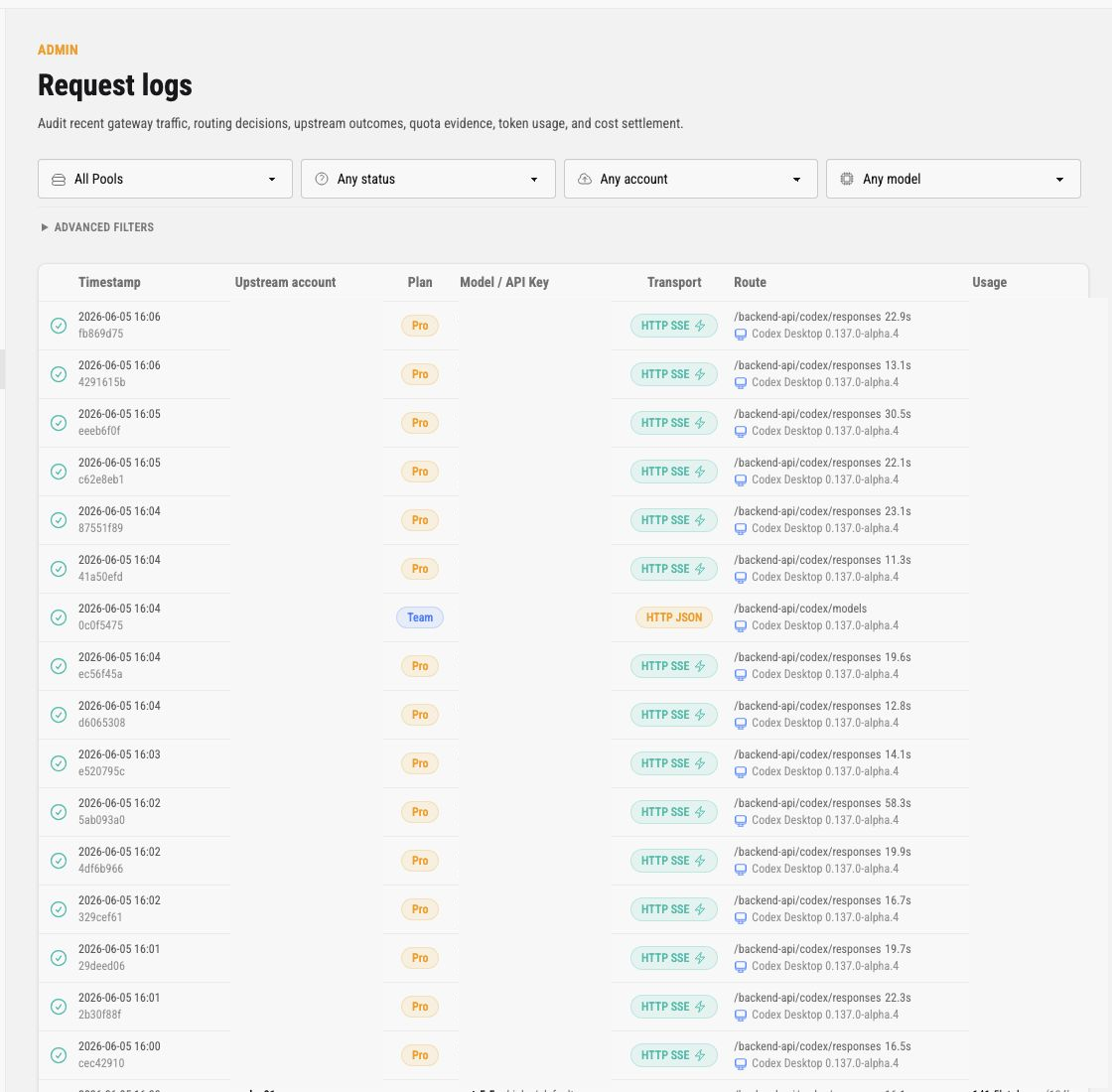
The screenshots in this guide redact live row values. The production UI shows safe labels and prefixes for operators, but public docs should not publish production identifiers or usage totals.
API-key usage boundaries
Section titled “API-key usage boundaries”Keep these surfaces separate when investigating usage:
| Surface | Scope | Use it for |
|---|---|---|
/admin/api-keys |
API-key lifecycle and policy | Create, edit, pause, resume, rotate, revoke, delete, inspect expiry and policy, and enable or disable Dashboard access. It does not show usage totals or charts. |
| API Key Observatory | One authenticated API key | Read-only bounded usage, model, cache, cost, latency, throughput, and recent sanitized outcome projections for that key. |
/admin/stats |
A visible Pool | Pool-level aggregate usage and capacity views for signed-in instance owners or assigned instance admins. |
/admin/request-logs |
Individual recorded requests | Sanitized request outcomes, attempts, settlement metadata, and routing context for administrative investigation. |
The Observatory is a separate browser surface authenticated by the API key’s Dashboard access capability. It does not reuse the instance-admin session, does not grant /admin/* access, and does not replace the runtime compatibility usage routes. Opening the Observatory does not itself create a runtime request.
Filters
Section titled “Filters”The top filters narrow the table without changing any data.
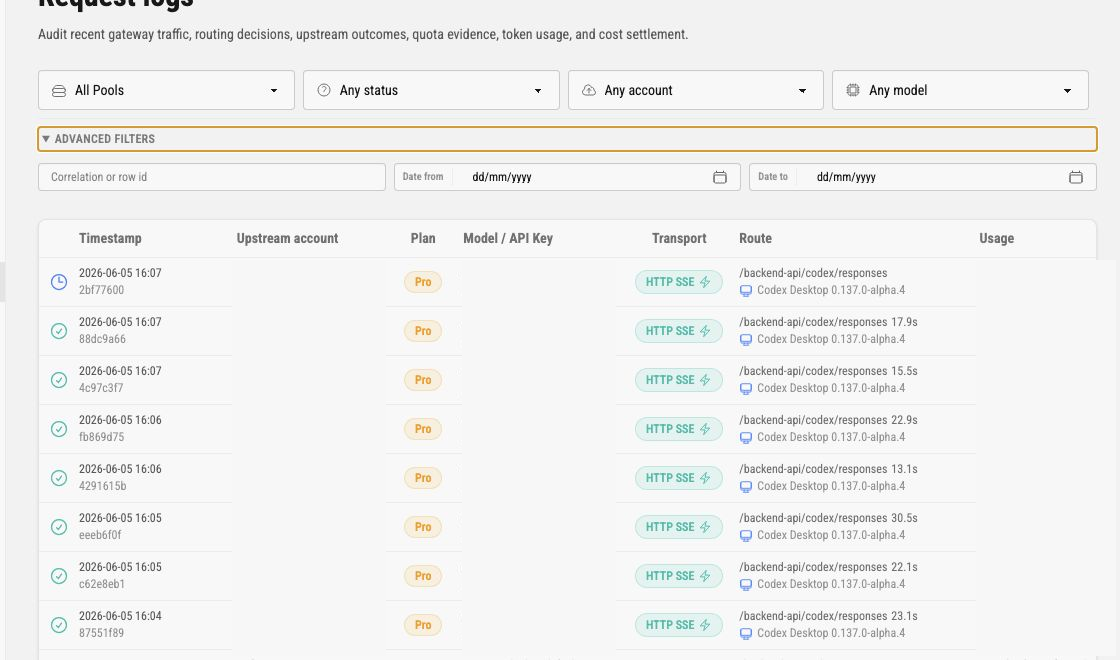
Primary filters are:
| Filter | Meaning |
|---|---|
| Pool | Limits rows to one Pool. Owners can inspect all visible Pools; assigned admins only see their Pool scope. |
| Status | Limits rows by request outcome, such as completed, failed, rejected, or in-progress states. |
| Upstream account | Limits rows to a visible upstream identity. When a Pool is selected, this list narrows to accounts assigned to that Pool. |
| Model | Limits rows to a model name observed in request logs. |
Advanced filters are:
Correlation or row id, for finding one request by known idDate from, for the start of the time rangeDate to, for the end of the time range
Invalid or unsupported filters are ignored with a warning so operators can fix the query without losing the page.
Table Columns
Section titled “Table Columns”The table shows the latest matching rows, with a hard page size limit.
| Column | Meaning |
|---|---|
| Status icon | Outcome indicator for the request row. Use the icon with the Errors column to understand failures. |
| Timestamp | Admission time and short row id. Use this when correlating with logs, audit events, or client reports. |
| Upstream account | Selected upstream account label and Pool name when selection metadata is visible. |
| Plan | Safe upstream plan badge when known. |
| Model / API Key | Requested or enforced model, then the effective reasoning effort with requested-vs-upstream detail when it was normalized, and the service tier the upstream reported, labelled as tier (for example high / tier default). When the request asked for a different tier, a muted token names it (for example tier default priority requested). A successful Responses request that sent no effort shows model default: the backend chose the model’s own default effort, which the gateway does not observe. The request drawer marks that case as not set and not sent. Rows for endpoints without reasoning, such as transcription, show only the tier. The API key label or safe prefix appears alongside. |
| Transport | Request transport and protocol family, such as HTTP JSON or HTTP SSE. A bolt icon marks a request priced at the priority tier. |
| Route | Runtime route family and safe client metadata. It can include path shape and latency, not request content. |
| Usage | Settled token and cost metadata when available. Missing usage can mean the request did not settle or pricing was unavailable. |
| Errors | Sanitized error summary lines. These should identify operational cause without exposing content or credentials. |
Status and Errors
Section titled “Status and Errors”Use status and errors together. A completed row with token usage usually means the request reached an upstream and settled successfully. A failed row may still show route, latency, or partial attempt metadata. A rejected row usually means admission or policy failed before upstream work.
OpenAI Responses response.incomplete can be a successful delivered terminal response. For example, an upstream may stop at max_output_tokens or a content filter and still return safe usage metadata. Those rows stay succeeded and should not be treated as upstream health failures. Error-coded incomplete terminals, stale continuation anchors, stream truncation, and client disconnects still appear as failures or interruptions with sanitized error codes.
Common causes to inspect are:
- Pool API key paused, revoked, expired, or attached to the wrong Pool
- requested model not allowed by the key policy
- no active upstream assigned to the Pool
- selected upstream needing reauthorization or token refresh
- quota evidence exhausted or stale
- upstream route failure or timeout
- request shape unsupported by the current compatibility surface
The Errors column should stay safe to copy into operator tickets. It should not include raw prompts, responses, uploaded file contents, credentials, or provider payloads.
Failed-attempt terminal diagnostics
Section titled “Failed-attempt terminal diagnostics”The attempt detail drawer can include three metadata-only fields for failed and retryable_failed attempts:
| Field | Meaning and safety behavior |
|---|---|
upstream_error_code | The sanitized provider terminal code. Any ASCII identifier using only [A-Za-z0-9_.-] and no more than 80 bytes stays readable; invalid grammar, control or invalid UTF-8, and overlong values are stored as sha256_<12 lowercase hex>. |
stream_terminal_type | The sanitized terminal event type, using the same ASCII grammar and 80-byte limit, then the same sha256_<12 lowercase hex> fallback for invalid values. |
upstream_error_param | A provider field or index path only when it matches the accepted grammar. Invalid values are omitted. |
These fields are detail-only diagnostics. They do not replace the semantic error shown in request status and error summaries, and they do not change the public response, retry, routing, health, or settlement behavior. Successful attempts do not show them. Rows written before this contract was deployed may have no diagnostic fields; treat that absence as unknown rather than as evidence that the provider omitted a code. Historical rows are not backfilled.
Serving-mode labels
Section titled “Serving-mode labels”When a request or attempt has a complete validated serving-mode snapshot, the detail drawer shows three metadata rows:
| Row | Meaning |
|---|---|
| Configured serving mode | The Pool-model setting captured for this request or attempt: auto, lite, or full. |
| Effective serving mode | The backend request shape selected for the captured snapshot: lite or full. |
| Serving mode source | catalog for an Auto resolution or override for an explicit Pool-model setting. |
The Routing summary reads the request snapshot, while each attempt in the timeline reads that attempt’s own persisted snapshot. The three rows are omitted for historical rows with absent or invalid mode metadata. They are never derived from request bodies, prompts, provider text, headers, credentials, or other payload data.
Serving mode is not part of the error classification. An ordinary terminal upstream 4xx is classified as upstream_status whichever mode resolved, a 429 as upstream_rate_limited, and an ordinary 5xx as upstream_status. To find the requests a provider refused, filter on upstream_status with an upstream status code in the 4xx range other than 429; that answer is complete across Auto, Lite, and Full. To narrow it to an explicit Full override, add the serving-mode snapshot rows above, which record full/full/override on the request and on each attempt. These classifications are independent of whether the drawer can show a serving-mode snapshot.
Upstream Websocket Connection Details
Section titled “Upstream Websocket Connection Details”For an attempt that actually used a current-release upstream websocket, the admin attempt-detail drawer can show an upstream_websocket_connection group with exactly four fields:
| Field | Meaning |
|---|---|
lifecycle_id | A generated canonical UUID shared by successful upstream websocket connections created within one in-process session lifecycle. It is not a provider or socket identifier. |
generation | The positive ordinal of a successfully established upstream websocket connection within that lifecycle. Reuse keeps the same generation; a successfully established replacement advances it. |
reused | Whether this request started on a connection that an earlier request had already established. |
reconnected | Whether this request was retried on a newly established connection after its reused connection failed before a response became visible. |
This group is attempt metadata only. It is omitted when metadata is missing, malformed, or unavailable for the selected transport. It is not added to request-level list rows and is not exposed by request-log MCP tools.
Websocket Close Triage
Section titled “Websocket Close Triage”Websocket request rows are created after gateway admission and reservation. If a websocket closes before a request row exists, inspect application logs for sanitized websocket close metadata instead of looking for prompt or frame content.
Safe close metadata can include route family, endpoint, transport, route class, phase, reason_class, elapsed milliseconds, safe session id prefixes, owner or proxy instance ids, and downstream epoch. Typical reason_class values include max_frame_size_exceeded for an oversized inbound websocket frame, timeout for downstream websocket idle close, and closed for a normal client close.
For downstream idle closes on backend Codex websockets and narrow public /v1/responses websockets, check the admin-managed websocket_idle_timeout_ms setting. Its default is 1_800_000 ms and the accepted range is 60_000..3_600_000 ms. This setting does not change upstream receive timeout classification.
Usage Metadata
Section titled “Usage Metadata”Usage lines summarize request accounting, including request count context, token totals, cached input tokens, and estimated cost when pricing is available. Treat these as operational attribution and capacity evidence. They are not a replacement for provider billing records or the key-local Observatory projection.
If usage is blank, check the request status first. A request can be admitted without final usage if it failed before settlement, if pricing was not matched, or if accounting metadata was not available for that route. A delivered incomplete response with missing upstream usage remains usage_unknown and does not get an invented settled cost from the reservation estimate.
Service tiers
Section titled “Service tiers”The request drawer keeps three tier facts apart:
| Row | Meaning |
|---|---|
| Requested tier | The tier the client sent or an API key policy enforced. fast is shown as priority. Not set means the request sent no tier. |
| Upstream reported | The service_tier value on the upstream’s final response event. Omitted when the upstream reported none. |
| Priced as | The pricing tier used for the request’s estimated cost. Shown only for priced requests. |
The ChatGPT Codex backend reports service_tier as auto while a response is in progress and default when it completes, including for requests sent with priority. The public OpenAI API reports priority for the same request. Codex Pooler forwards the requested tier and prices the tier the upstream reported, with one exception: a priority request reported as default is priced at priority, because the backend reports default for every priority request while it serves the request in Fast mode, which uses plan usage at a higher rate than standard. Such a request shows tier default priority requested in the list and priority under Priced as. When the upstream reports no tier, or reports auto, the request is priced at its requested tier. Requests settled by earlier releases keep the tier they were priced at.
A default report on a priority request is not evidence that priority processing was skipped. To judge whether it was applied, compare latency across requests for the same account, model, and transport.
Served model
Section titled “Served model”The list’s model column shows the model the client requested. The upstream can answer with a different model than the one the request was sent as, for example while the provider runs an A/B test or substitutes a faster model. Codex Pooler records the model the upstream declared on its response object separately from the model it sent, so that substitution stays visible:
| Row | Meaning |
|---|---|
| Model | The model the client requested. |
| Sent upstream | The upstream model identifier the latest attempt sent, after Pool aliases and catalog mapping. |
| Upstream served | The model value the upstream declared on the first response event of the latest attempt (or on the JSON body for non-streamed responses). Omitted when the upstream declared none. |
When the served model differs from the one sent, the list shows a served <model> token under the model name. A row without the token either received the model it sent or received no declaration. The served model is recorded for observability only; pricing keeps using the model the request was sent as. Values that are not plain model identifiers are stored as a short fingerprint rather than verbatim.
Operational Checklist
Section titled “Operational Checklist”When investigating a client report, check request logs in this order:
- filter by Pool or API key context if known
- filter by request id when the client provided one
- narrow by model or upstream only after confirming the Pool
- inspect status, transport, route, and errors
- compare timestamps with Audit logs for recent policy or lifecycle changes
- open the Pool page to confirm active status and assignments
- open the Upstreams page to confirm readiness, quota, and freshness
- open API keys to confirm key policy, status, expiry, and limits
If no row exists, the request may not have reached Codex Pooler, may have used a different Pool API key, or may be outside the visible operator scope.