# Cursor on Codex Pooler
Use Cursor's OpenAI API key settings to connect an explicit model to Codex
Pooler's narrow OpenAI-compatible `/v1` surface.
:::caution[Public endpoint required]
Cursor constructs requests on its servers and then calls your endpoint.
**Localhost and private LAN addresses are not supported on this BYOK path.**
This differs from clients that connect directly from your computer.
See [Cursor's network explanation](https://forum.cursor.com/t/149366/3).
:::
## Before you start
- An active Cursor Pro or higher subscription. Cursor staff confirms that
[custom BYOK requires a paid plan](https://forum.cursor.com/t/165490/5),
including [Ask mode](https://forum.cursor.com/t/150484/3).
- A public HTTPS Codex Pooler endpoint reachable from Cursor's servers.
- A Pool API key permitted to use the selected model.
Your Pool API key passes through Cursor's backend with BYOK requests. See
[Cursor's API key documentation](https://cursor.com/help/models-and-usage/api-keys)
for its handling of provider credentials.
## Configure the connection
Open **Cursor Settings → Models → API Keys** and configure:
| Setting | Value |
| --- | --- |
| OpenAI API key | Your Pool API key |
| Use OpenAI API key | On |
| Override OpenAI Base URL | On |
| OpenAI base URL | `https://codex-pooler.example.com/v1` |
| Model | `gpt-5.6-luna`, or another exact model ID exposed by your Pool |
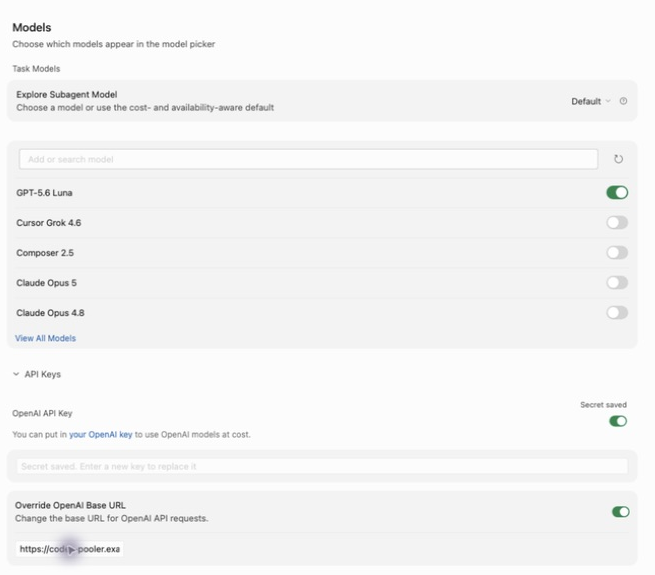
The key field is write-only: **Secret saved** can appear while the field looks
empty. Saving a key and enabling **Use OpenAI API key** are separate actions.
Check both switches after restarting or changing settings.
Keep the base URL at `/v1`; do not append `/responses` or `/chat/completions`.
Start a **new chat**, turn **Auto** off, and select the explicit model.
## Choose a model
Cursor's model list is not an import of the Pooler's `/v1/models` catalog.
Refreshing the list retrieves Cursor's own catalog. Verify model availability
against your Pool separately.
If Cursor already recognizes an ID, select its existing entry. Disabling
other models changes the picker; it does not force **Auto** to use the last
enabled model or your gateway. An Auto answer is not evidence of Pooler use.
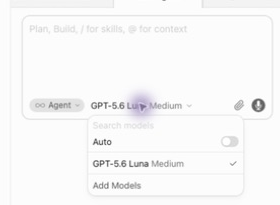
Keep the exact model ID for initial verification. A prefix such as
`pooler/` changes the identifier and may also change Cursor's request
construction; it is not merely a display label.
## Verify the connection
Send a short request with the explicit model selected. In Codex Pooler's
request logs, verify the time, API key, requested model, final status, and
upstream attempt. Then test a tool call and its continuation in a disposable
project before relying on Agent for edits.
A rejected input can fail before accounting admission and therefore have no
request row. Check the HTTP ingress log for the request path, status and
`Cursor/1.0` user agent in that case. Do not capture raw prompts or credentials.
## Troubleshooting
| Symptom | What to check |
| --- | --- |
| Named models unavailable | Confirm Cursor recognizes your active paid subscription. A [similar erroneous gate on Pro](https://forum.cursor.com/t/169438/5) has also been reported. |
| Access to private networks is forbidden | Use a publicly reachable HTTPS endpoint instead of localhost or a private address. |
| Model name is not valid | Check the API key switch, exact model ID, Pool permissions, and any team BYOK policy. Start a new chat after enabling the key. |
| Unsupported parameter | [Report a bug](https://github.com/icoretech/codex-pooler/issues/new) with your Cursor and Codex Pooler versions, selected model, parameter name, and sanitized error code. Do not include API keys, prompts, or raw request bodies. |
| Auto answers but Pooler has no request | Select the explicit model. Auto can use Cursor's own routing. |
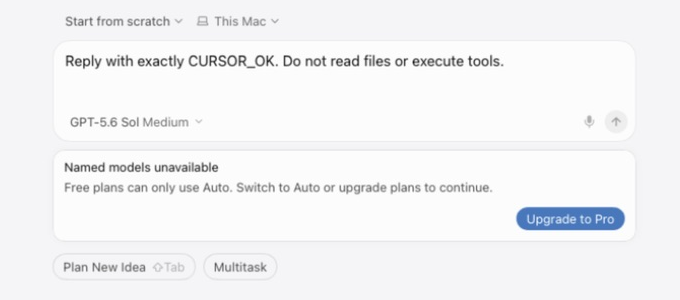
*Enabling BYOK does not remove the paid-plan requirement for named models.*
## Compatibility notes
This guide covers Cursor desktop with an explicit model and a Pool API key.
It does not cover Auto, Tab completion, Cloud Agents, or the separate Cursor
Agent CLI.
The `cursor` terminal command opens the desktop editor; it does not provide
a separate connection to Codex Pooler.